LTX-2 LoRA Training: Fine-Tune Custom Video Models (2025 Guide)
Complete guide to training LoRAs for LTX-2 video generation. Dataset preparation, training configuration, and deployment for custom video styles and subjects.
LTX-2 supports LoRA fine-tuning, allowing you to train custom video generation models for specific styles, subjects, or concepts. This guide covers everything from dataset preparation to deployment of your trained LoRA.
Quick Answer: LTX-2 LoRA training requires 10-30 high-quality video clips with consistent captions. Training takes 2-8 hours on a 24GB GPU. The official Lightricks trainer supports subject LoRAs (people, characters), style LoRAs (visual aesthetics), and concept LoRAs (specific actions or scenarios). Results quality depends heavily on dataset curation.
- Hardware: 24GB+ VRAM recommended (RTX 4090, A100)
- Dataset: 10-30 video clips, 3-10 seconds each
- Training time: 2-8 hours depending on configuration
- Use cases: Characters, styles, actions, effects
- Output: Compatible with ComfyUI and official inference
Understanding LTX-2 LoRA Training
LoRA, which stands for Low-Rank Adaptation, is a technique that lets you fine-tune large AI models without modifying the entire model. Think of it like teaching the model a new skill or concept while keeping all its existing knowledge intact. For video generation, this means you can train LTX-2 to understand your specific character, visual style, or unique concept without needing the massive compute resources that full model training would require.
The beauty of LoRA training is its accessibility. While training a full video model from scratch requires hundreds of thousands of dollars in compute and millions of training examples, a LoRA can be trained in a few hours on consumer hardware with just a handful of video clips. The trade-off is that LoRAs are more limited in scope. They work best for adding specific capabilities rather than fundamentally changing how the model works.
What Can You Train?
Subject LoRAs: Train on a specific person, character, or object to generate consistent appearances in new videos. This is probably the most popular use case because it solves the biggest limitation of AI video: inconsistency. With a subject LoRA, you can generate multiple clips featuring the same character, and they'll actually look like the same character.
- Real people (with consent)
- Fictional characters
- Products or objects
- Animals or creatures
Style LoRAs: Capture a visual aesthetic to apply to any content.
- Film looks (noir, vintage, modern)
- Animation styles (anime, 3D, stop-motion)
- Artistic movements (impressionist, cyberpunk)
- Color grading approaches
Concept LoRAs: Teach specific actions, effects, or scenarios.
- Motion patterns (specific dance moves)
- Visual effects (explosions, magic)
- Camera movements (specific dolly shots)
- Transitions and edits
LoRA vs Full Fine-Tuning
| Aspect | LoRA | Full Fine-Tuning |
|---|---|---|
| VRAM required | 24GB | 80GB+ |
| Training time | 2-8 hours | 24-72 hours |
| Dataset size | 10-30 clips | 100+ clips |
| Flexibility | High | Lower |
| File size | 50-500MB | Full model |
LoRA is the practical choice for most users.
Hardware Requirements
Minimum Requirements
- GPU: NVIDIA RTX 4090 (24GB VRAM)
- RAM: 32GB system memory
- Storage: 100GB free SSD space
- CUDA: 12.1 or higher
Recommended Setup
- GPU: A100 40GB or H100
- RAM: 64GB system memory
- Storage: 500GB NVMe SSD
- Cloud: RunPod or Lambda Labs
Cloud Training Options
If you lack local hardware:
| Service | GPU Options | Cost/Hour |
|---|---|---|
| RunPod | A100 40GB | $1.89 |
| Lambda Labs | A100 80GB | $2.49 |
| Vast.ai | Various | Variable |
| Google Colab Pro+ | A100 | $49.99/month |
Dataset Preparation
Your dataset is the foundation of everything. A mediocre training setup with excellent data will outperform a perfect training setup with poor data every time. I've seen people spend days tweaking hyperparameters when their real problem was inconsistent captions or low-quality source clips. Before you touch any training code, invest serious time in curating your dataset.
The good news is that you don't need hundreds of clips. For most LoRAs, 15-30 high-quality examples work better than 100 mediocre ones. Quality means high resolution without compression artifacts, consistent lighting and framing, and clear visibility of whatever concept you're trying to teach. The model learns patterns from your examples, so if your examples are inconsistent, your LoRA will be inconsistent too.
Video Requirements
Technical specifications:
- Resolution: 720p minimum, 1080p recommended
- Frame rate: 24-30 FPS
- Duration: 3-10 seconds per clip
- Format: MP4 (H.264) or WebM
- Quality: No compression artifacts
Content guidelines:
- Consistent lighting across clips
- Clear subject visibility
- Varied angles and compositions
- Minimal text overlays
- No watermarks
Dataset Size Guidelines
| LoRA Type | Minimum Clips | Recommended | Notes |
|---|---|---|---|
| Subject | 10 | 20-30 | Varied poses/angles |
| Style | 15 | 30-50 | Consistent aesthetic |
| Concept | 10 | 15-25 | Clear examples |
Collecting Training Data
For subject LoRAs:
- Record or collect 15-30 clips of subject
- Include varied angles (front, side, 3/4)
- Different lighting conditions
- Various backgrounds
- Multiple expressions/poses
For style LoRAs:
- Source clips with consistent style
- Varied content within style
- Different subjects, same aesthetic
- Consistent color grading
- Similar motion characteristics
Captioning Your Dataset
Every clip needs a detailed caption. Good captions are critical.
Caption structure:
[trigger word], [subject description], [action], [setting], [style elements], [technical details]
Example captions:
For subject LoRA (person named "alexmodel"):
alexmodel, young woman with brown hair,
walking through city street,
urban environment with modern buildings,
natural lighting, casual clothing,
cinematic movement, slight camera follow
For style LoRA (anime style "anistyle"):
anistyle, animated character in action pose,
dynamic movement with speed lines,
vibrant color palette with high contrast,
cel-shaded rendering, smooth animation,
dramatic camera angle
Caption Best Practices
- Use consistent trigger words - Same trigger in every caption
- Be specific - Avoid vague descriptions
- Include motion - Describe what's happening
- Note technical aspects - Camera, lighting, style
- Vary non-essential elements - Keep core concept, vary details
Setting Up the Training Environment
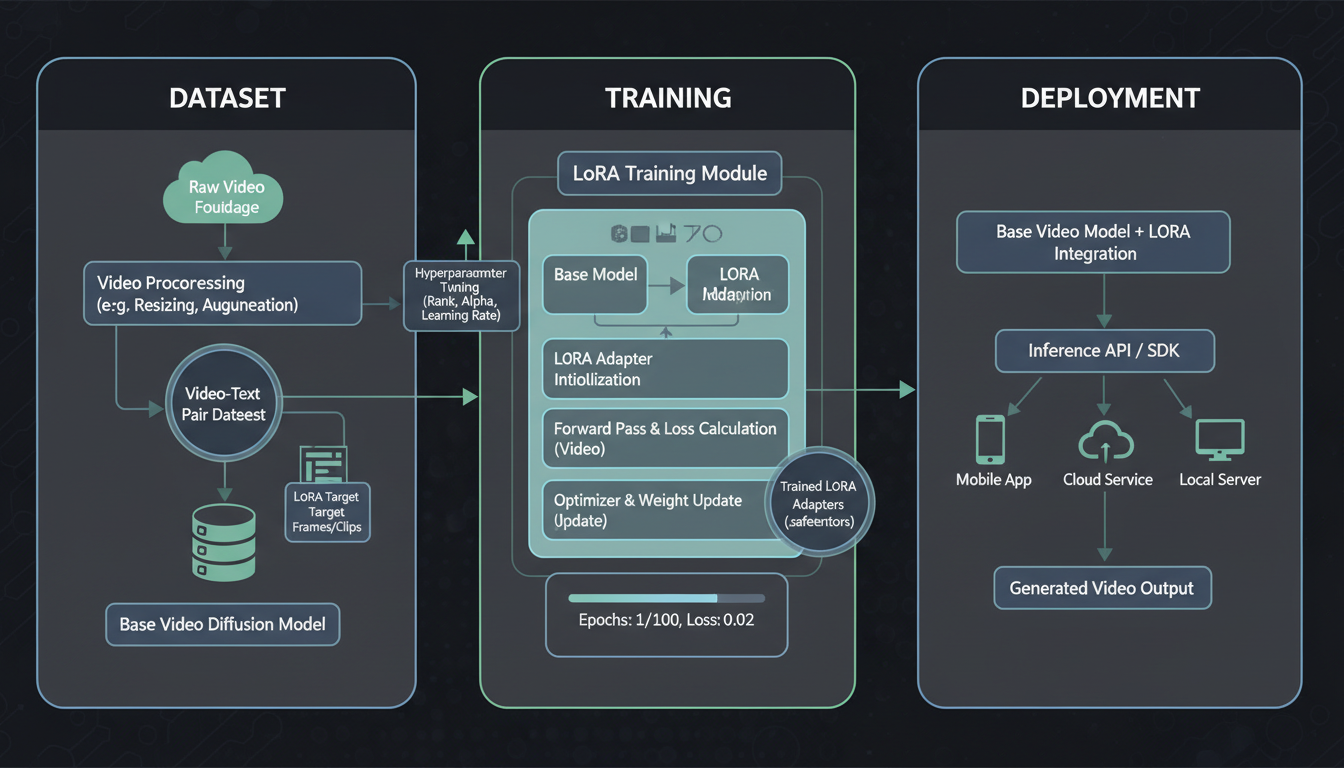 The LoRA training pipeline moves from dataset preparation through training to deployment.
Installation
Clone the official LTX-2 repository:
git clone https://github.com/Lightricks/LTX-2.git
cd LTX-2
Set up the environment:
## Using uv (recommended)
uv sync --frozen

## Or using pip
pip install -r requirements.txt
Download Base Model
## Download LTX-2 base model
huggingface-cli download Lightricks/LTX-2 --local-dir models/ltx-2
Prepare Dataset Structure
dataset/
├── videos/
│   ├── clip_001.mp4
│   ├── clip_002.mp4
│   └── ...
├── captions/
│   ├── clip_001.txt
│   ├── clip_002.txt
│   └── ...
└── metadata.json
Training Configuration
Configuration is where you control the learning process. These settings determine how aggressively the model learns, how much capacity it has for new information, and how long training runs. Getting these right isn't rocket science, but understanding what each parameter does helps you troubleshoot when things don't work as expected.
The defaults provided below work for most use cases, but you may need to adjust based on your specific situation. Training a detailed subject LoRA might benefit from higher rank and more steps, while a simple style LoRA might need less. Start with conservative settings and adjust based on results rather than trying to optimize everything upfront.
Basic Training Config
Create train_config.yaml:
## Model settings
model_path: "models/ltx-2"
output_dir: "outputs/my_lora"

## LoRA settings
lora_rank: 32
lora_alpha: 32
lora_dropout: 0.1

## Training settings
learning_rate: 1e-4
batch_size: 1
gradient_accumulation: 4
max_steps: 2000
warmup_steps: 100

## Dataset
dataset_path: "dataset/"
resolution: 720
fps: 24
max_frames: 72

## Optimization
mixed_precision: "bf16"
gradient_checkpointing: true
Configuration Explained
lora_rank: Higher = more capacity, more VRAM (16-64 typical) lora_alpha: Usually equal to rank for 1:1 scaling learning_rate: 1e-4 is safe starting point max_steps: 1000-3000 for most LoRAs resolution: Match your target output resolution
Subject LoRA Configuration
For training on specific subjects:
lora_rank: 64
lora_alpha: 64
learning_rate: 5e-5
max_steps: 2500
## Focus on appearance preservation
train_text_encoder: true
Style LoRA Configuration
For training on visual styles:
lora_rank: 32
lora_alpha: 32
learning_rate: 1e-4
max_steps: 3000
## Focus on visual characteristics
train_text_encoder: false
Running Training
Start Training
python train_lora.py --config train_config.yaml
Monitor Progress
Training outputs checkpoints and logs:
outputs/my_lora/
├── checkpoints/
│   ├── step_500.safetensors
│   ├── step_1000.safetensors
│   └── ...
├── logs/
│   └── training.log
└── samples/
    └── validation_samples/
Validation During Training
Every N steps, the trainer generates validation samples. Check these to monitor:
- Is the concept being learned?
- Any quality degradation?
- Overfitting signs?
When to Stop Training
Good signs:
- Validation samples show concept
- Loss has stabilized
- Concept appears without artifacts
Overfitting signs:
- Only training data recreated
- Loss still dropping but quality worse
- Artifacts appearing
Typical training: 1500-2500 steps for subjects, 2000-3500 for styles.
Using Your Trained LoRA
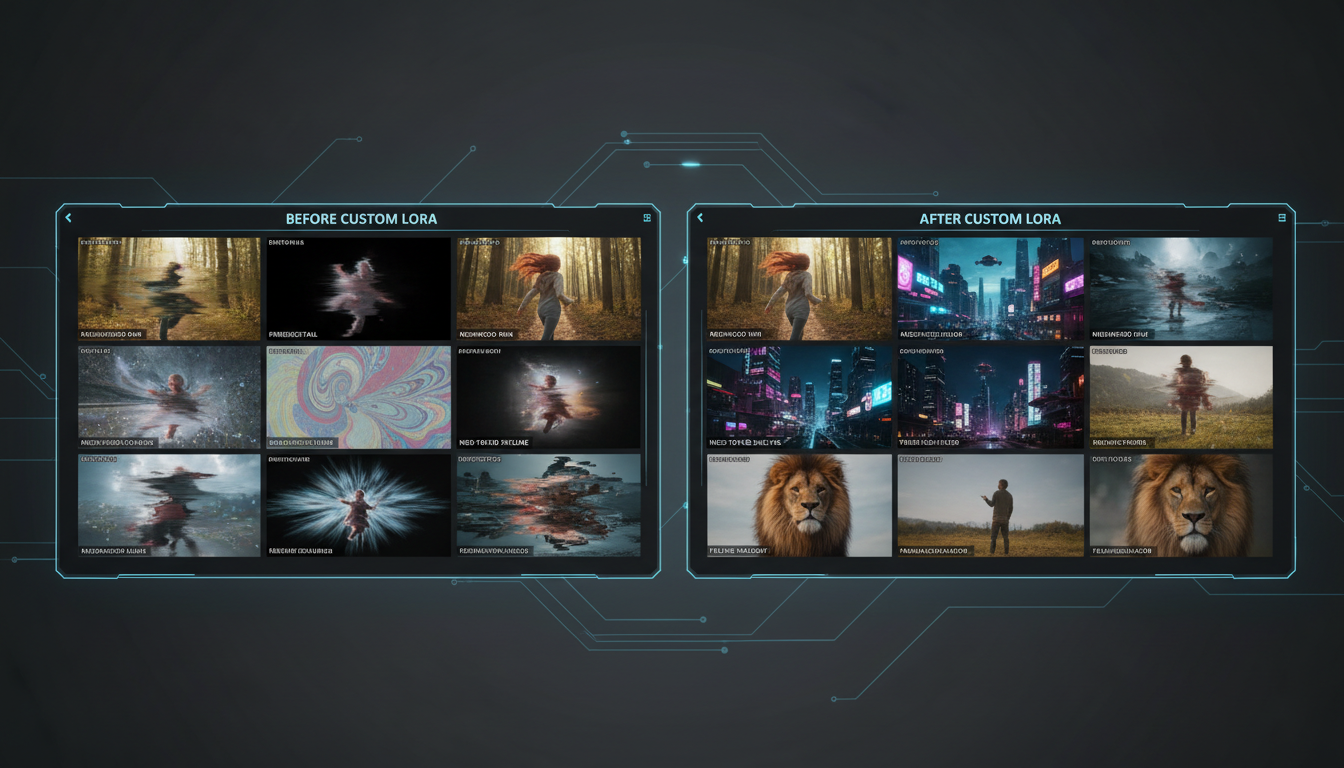 Custom LoRAs enable consistent character and style reproduction in generated videos.
In ComfyUI
- Copy LoRA file to
ComfyUI/models/loras/ - Use LoRA Loader node
- Connect to LTX-2 model
- Set strength (0.5-1.0 typical)
Strength Guidelines
| Strength | Effect |
|---|---|
| 0.3-0.5 | Subtle influence |
| 0.6-0.8 | Strong presence |
| 0.9-1.0 | Maximum effect |
| 1.0+ | May cause artifacts |
Combining Multiple LoRAs
You can stack LoRAs:
Subject LoRA (0.8) + Style LoRA (0.6)
Total weight shouldn't exceed ~1.5 to avoid artifacts.
Troubleshooting Training
Out of Memory Errors
Solutions:
- Reduce batch size to 1
- Enable gradient checkpointing
- Lower resolution during training
- Use smaller lora_rank
- Try bf16 mixed precision
LoRA Not Learning
Check:
- Caption quality and consistency
- Trigger word in all captions
- Dataset variety
- Learning rate (try higher)
- Sufficient training steps
Overfitting
Signs: Only recreates training data Solutions:
- Reduce training steps
- Lower learning rate
- Add more diverse data
- Increase lora_dropout
Quality Degradation
Causes: Training too long, rate too high Solutions:
- Use earlier checkpoint
- Lower learning rate
- Reduce max_steps
Advanced Techniques
Progressive Training
Start with low rank, increase:
## Phase 1: Learn basics
lora_rank: 16
max_steps: 1000

## Phase 2: Add detail
lora_rank: 32
resume_from: "checkpoint_1000"
max_steps: 2000
Multi-Concept Training
Train multiple concepts in one LoRA:
## Different trigger words for each concept
alexmodel - person A
bethmodel - person B
Requires larger rank and more training data.
Audio-Aware LoRAs
Include audio descriptions in captions for LoRAs that generate with sound:
alexmodel speaking, woman with brown hair,
talking to camera in studio,
clear voice, conversational tone,
studio acoustics, minimal background noise
Deployment and Quality Evaluation
Testing Your Trained LoRA
Before deployment, thoroughly test your LoRA:
Generation tests:
- Generate 10-20 clips using your trigger word
- Test various prompt variations
- Compare to training data quality
- Verify concept transfers to new contexts
Strength testing:
Test at: 0.3, 0.5, 0.7, 0.9, 1.0
- What strength best activates concept?
- At what strength do artifacts appear?
- What's the optimal range?
Compatibility testing:
- Test with base prompts (no other modifiers)
- Test with style descriptions
- Test combined with other LoRAs
- Test at different resolutions
Quality Assessment Criteria
Subject LoRAs:
- Does the subject look consistent across generations?
- Are key identifying features preserved?
- Does it work at different angles and distances?
- Is quality maintained in varied contexts?
Style LoRAs:
- Does the style apply to various subjects?
- Are the key visual characteristics present?
- Is the style subtle or overpowering at different strengths?
- Does it blend well with different prompts?
Optimizing Inference Settings
Once deployed, optimize generation settings:
CFG Scale:
- Lower (5-7): More creative, looser style adherence
- Higher (8-12): Stricter adherence to prompt and LoRA
Steps:
- 20 steps: Fast preview
- 30 steps: Balanced quality
- 50+ steps: Maximum quality
Resolution matching: Generate at or near training resolution for best results.
Version Management
As you iterate on LoRAs:
Naming convention:
concept_v1.safetensors
concept_v2_more_data.safetensors
concept_v3_lower_lr.safetensors
Documentation: Keep notes on each version:
- Training parameters
- Dataset changes
- Quality observations
- Known issues
Real-World Training Scenarios
Training a Character LoRA
Complete walkthrough for a fictional character:
1. Dataset collection:
- Commission 20-30 consistent character illustrations
- Vary poses, expressions, and contexts
- Maintain character design consistency
2. Captioning:
charname, [character's defining visual features],
[action being performed], [setting],
[style elements], detailed animation quality
3. Training settings:
lora_rank: 64
learning_rate: 5e-5
max_steps: 2000
4. Result: Character generates consistently across prompts.
Training a Brand Style LoRA
For consistent brand video content:
1. Dataset:
- 50+ clips representing brand aesthetic
- Consistent color palette, lighting, pacing
- Various content types within style
2. Captioning:
brandstyle, [content description],
[brand color palette], [lighting style],
professional marketing quality,
[camera/composition style]
3. Application: Generate on-brand content for any subject.
Frequently Asked Questions
How much VRAM do I need?
24GB minimum for comfortable training. 40GB+ for larger datasets or higher resolution. Cloud options like RunPod offer A100 GPUs with 40-80GB VRAM at reasonable hourly rates.
Can I train on consumer GPUs?
RTX 4090 works well. RTX 3090 is possible with aggressive optimization like gradient checkpointing and lower batch size. RTX 3080 and below will struggle significantly.
How long does training take?
2-8 hours typically on 24GB GPU. Subject LoRAs with 20-30 clips finish faster (2-4 hours). Style LoRAs with 50+ clips take longer (4-8 hours). Cloud A100s can cut these times in half.
Can I train on my own face?
Yes, with appropriate consent and data privacy considerations. Use the same subject LoRA techniques. Consider privacy implications before sharing publicly.
How do I share my LoRA?
Upload to Hugging Face or Civitai. Include trigger word documentation, example prompts, recommended strength settings, and sample outputs.
Do I need captions for every clip?
Yes. Captions are critical for training quality. Poor captions = poor results. Every clip needs a detailed caption with your trigger word.
What if training fails midway?
Most trainers support resume from checkpoint. If not, reduce batch size or enable more aggressive memory optimization.
How do I know when to stop training?
Monitor validation samples. Stop when the concept appears clearly without artifacts. Loss values alone don't indicate quality.
Can I train multiple characters in one LoRA?
Yes, using different trigger words for each. Requires larger rank (96-128) and more training data. Each character needs distinct trigger word.
Will my LoRA work with future LTX updates?
Likely yes for minor updates. Major architecture changes may require retraining. Keep your dataset organized for potential retraining.
Wrapping Up
Training your own LTX-2 LoRA is one of the most powerful ways to customize AI video generation for your specific needs. Whether you're creating consistent character content, establishing a unique visual brand, or teaching the model specialized concepts, the investment in learning this process pays dividends in the quality and consistency of your output.
The process isn't trivial, but it's far more accessible than it was even a year ago. With a single RTX 4090 or a few hours of cloud GPU time, you can create custom capabilities that would have required enterprise-level resources not long ago. The key is approaching it methodically: start with excellent data, use proven configurations, monitor your training closely, and iterate based on results.
LTX-2 LoRA training opens up powerful customization for video generation. The process requires good hardware and careful dataset preparation, but results can be transformative.
Key takeaways:
- 24GB VRAM minimum, cloud training is viable
- Dataset quality matters more than quantity
- Consistent captions with trigger words are essential
- Monitor validation samples during training
- Stop before overfitting
With a well-trained LoRA, you can generate consistent characters, unique styles, or specialized content that the base model can't produce.
For LTX-2 basics, see our complete LTX-2 guide. For general LoRA concepts, read our LoRA training guide. Try video generation at Apatero.com.
Some models you cannot download at any VRAM
Veo, Kling and Nano Banana have closed weights. There is no local build, no quantization, no 24GB workaround. Run them in the browser instead. Check current model access and generation costs in the app.
Related Articles
AI Video Denoising and Restoration: Complete Guide to Fixing Noisy Footage (2025)
Master AI video denoising and restoration techniques. Fix grainy footage, remove artifacts, restore old videos, and enhance AI-generated content with professional tools.
AI Video Multi-Clip Editing: Complete Workflow for Smooth Transitions (2025)
Master multi-clip AI video editing workflows. Learn to combine LTX-2, WAN, and Hunyuan clips into cohesive videos with smooth transitions and consistent style.

LTX-2 on 8GB VRAM: Complete Optimization Guide for Low-End GPUs (2025)
Run LTX-2 video generation on 8GB VRAM GPUs. Complete guide to memory optimization, FP8 quantization, tile processing, and settings for RTX 3070, 3060, and similar cards.