RVC Voice Cloning for AI Girlfriend Characters: Complete Setup Guide
Learn how to create custom voices for your AI girlfriend using RVC voice cloning. Step-by-step tutorial covering training, conversion, and integration with AI companions.
Adding voice to your AI girlfriend character transforms the experience from text-based interaction to something far more immersive. RVC (Retrieval-based Voice Conversion) has become the go-to technology for creating custom voices, offering quality that rivals professional voice synthesis at zero cost.
I've spent months experimenting with RVC for character voices, testing different training approaches, model configurations, and integration methods. This guide shares everything I've learned about creating believable voices for AI companions.
Quick Answer: RVC lets you create custom voices by training on audio samples of your target voice. With 10-30 minutes of clean audio, you can train a model that converts any input voice to sound like your character. Integration with TTS systems enables real-time voice generation for AI girlfriend applications. The entire setup takes 2-4 hours and requires a GPU with 6GB+ VRAM.
:::tip[Key Takeaways]
- Key options include TTS Engine: and RVC Conversion:
- Start with the basics before attempting advanced techniques
- Common mistakes are easy to avoid with proper setup
- Practice improves results significantly over time :::
- Understanding RVC voice cloning technology
- Collecting and preparing training audio
- Training your character's voice model
- Real-time voice conversion setup
- Integration with AI companion applications
Understanding RVC Voice Technology
Before exploring the technical setup, understanding how RVC works helps you make better decisions throughout the process. RVC doesn't synthesize voice from scratch. Instead, it converts one voice into another while preserving the original speech content.
Think of it like a voice filter that transforms the speaker's characteristics while keeping their words, timing, and emotion intact. You speak (or use text-to-speech), and RVC converts that audio to sound like your trained character.
This approach offers advantages over pure text-to-speech. Emotional nuance transfers from the input voice. Natural speech patterns emerge without complex prompt engineering. Real-time conversion enables live applications.
The quality depends heavily on your training data. Clear, consistent audio produces better models. More diverse training samples (different emotions, volumes, speeds) create more versatile voices.
Preparing Your Training Audio
Training data quality directly determines voice quality. Garbage in, garbage out applies perfectly here. Spending extra time on audio preparation saves frustration later.
Audio Source Options
Option 1: Existing recordings. If you have audio of your target voice, this is ideal. Audiobooks, podcasts, YouTube videos, or previous recordings work well. Ensure you have rights to use the audio.
Option 2: Voice actors. Commission a voice actor to record training scripts. Platforms like Fiverr offer affordable options. Provide clear direction about character personality and speech style.
Option 3: Synthetic starting point. Use high-quality TTS to generate initial training audio, then refine. This works for fictional characters with no existing voice. Results vary based on TTS quality.
Audio Requirements
For best results, your training audio should meet these specifications:
- Duration: 10-30 minutes total (more helps but has diminishing returns)
- Format: WAV or FLAC, 44.1kHz or 48kHz sample rate
- Quality: No background noise, no music, minimal reverb
- Content: Varied sentences, emotions, and pacing
- Speaker: Only your target voice (no conversations)
Cleaning and Preparing Audio
Raw audio rarely meets training requirements. Use audio editing software (Audacity is free and sufficient) to:
Remove background noise: Use noise reduction tools. Sample a quiet section, then apply reduction to entire file. Don't over-process, as this creates artifacts.
Normalize volume: Keep consistent loudness throughout. Avoid compression that squashes dynamic range, as emotion lives in volume variation.
Trim silence: Remove long pauses and dead air. RVC training handles short pauses fine, but extended silence wastes training resources.
Split into segments: Create 5-15 second clips rather than one long file. This helps training handle variety better.
Remove non-speech: Cut coughs, um's, uh's, and other non-speech sounds unless you specifically want these in your model.
 Clean audio preparation is essential for quality RVC models
Installing RVC
Several RVC implementations exist. For beginners, RVC WebUI provides the most accessible interface. Advanced users might prefer command-line versions for automation.
RVC WebUI Installation
Clone the repository from GitHub:
git clone https://github.com/RVC-Project/Retrieval-based-Voice-Conversion-WebUI
cd Retrieval-based-Voice-Conversion-WebUI
Install dependencies (Python 3.8+ required):
pip install -r requirements.txt
Download pretrained models from the releases page. Place them in the appropriate directories as documented. The base models (hubert, rmvpe) enable training without starting from absolute scratch.
Launch the interface:
python infer-web.py
Access through your browser at localhost:7865.
Hardware Requirements
RVC training uses GPU acceleration. Minimum specs:
- GPU: NVIDIA with 6GB+ VRAM (8GB+ recommended)
- RAM: 16GB system memory
- Storage: 20GB free space for models and training data
AMD GPUs work with additional setup using DirectML or ROCm, but NVIDIA remains the smoothest experience.
For users without adequate hardware, cloud GPU services like Google Colab, Runpod, or Vast.ai provide affordable alternatives.
Training Your Voice Model
With audio prepared and RVC installed, training transforms your audio samples into a usable voice model.
Training Configuration
In the RVC WebUI, navigate to the training tab. Configure these settings:
Free ComfyUI Workflows
Find free, open-source ComfyUI workflows for techniques in this article. Open source is strong.
Experiment name: Choose something descriptive like "girlfriend_voice_v1"
Training data path: Point to your prepared audio folder
Sample rate: Match your audio files (typically 40000 or 48000)
Training epochs: Start with 200-500, increase if quality insufficient
Batch size: Depends on VRAM (4-8 for 8GB GPU)
Save frequency: Every 50 epochs lets you compare versions
The Training Process
Training proceeds through several stages:
Preprocessing: Analyzes audio, extracts features, creates training dataset. Takes 5-30 minutes depending on audio length.
Feature extraction: Computes pitch and voice characteristics. Uses RMVPE for pitch, which handles varied content better than older methods.
Training: Actually trains the model. The progress bar shows epochs completed. Loss values should generally decrease over time.
Index building: Creates the retrieval index that helps match voice characteristics. Improves quality but can be skipped for testing.
Training 500 epochs typically takes 1-3 hours on consumer GPUs. Watch for loss values stabilizing, indicating the model has learned what it can from your data.
Evaluating Your Model
Don't just accept the final model. Test throughout training:
- Grab models saved at different epochs
- Convert the same test audio with each
- Compare quality, naturalness, and accuracy
- Choose the best version (not always the latest)
Common issues to check:
Want to skip the complexity? Apatero gives you professional AI results instantly with no technical setup required.
- Robotic sound: Usually undertrained or poor training audio
- Artifacts: Overtraining or too aggressive settings
- Wrong pitch: Pitch detection issues in training
- Inconsistent quality: Training data variety problems
Using Your Voice Model
With a trained model, you can convert any audio to your character's voice.
Single File Conversion
For one-off conversions:
- Load your trained model in RVC WebUI
- Upload or record input audio
- Adjust settings (pitch shift, index ratio)
- Click convert and wait for processing
- Download the converted audio
Key settings to adjust:
Pitch shift: Transpose output up/down in semitones. Useful when input voice differs significantly from target.
Index ratio: How much the retrieval index influences output. Higher values match training voice more closely but may reduce naturalness.
Filter radius: Smooths pitch variations. Higher values reduce pitch artifacts but may sound less dynamic.
Protect: Preserves breathing and consonants. Useful for maintaining natural speech characteristics.
Real-Time Voice Conversion
For live applications, RVC supports real-time conversion through various interfaces:
RVC WebUI realtime: Built-in realtime tab for testing. Latency around 100-200ms.
Voice Changer: Dedicated realtime conversion app with lower latency. Better for actual use.
Integration APIs: Connect to other applications through voice loopback.
Setup for realtime use:
- Configure virtual audio cables (VB-Cable, Voicemeeter)
- Route microphone through RVC
- Output converted audio to virtual speaker
- Use virtual speaker as input in target application
Earn Up To $1,250+/Month Creating Content
Join our exclusive creator affiliate program. Get paid per viral video based on performance. Create content in your style with full creative freedom.
Integration with AI Companions
The real magic happens when you combine RVC with AI girlfriend applications.
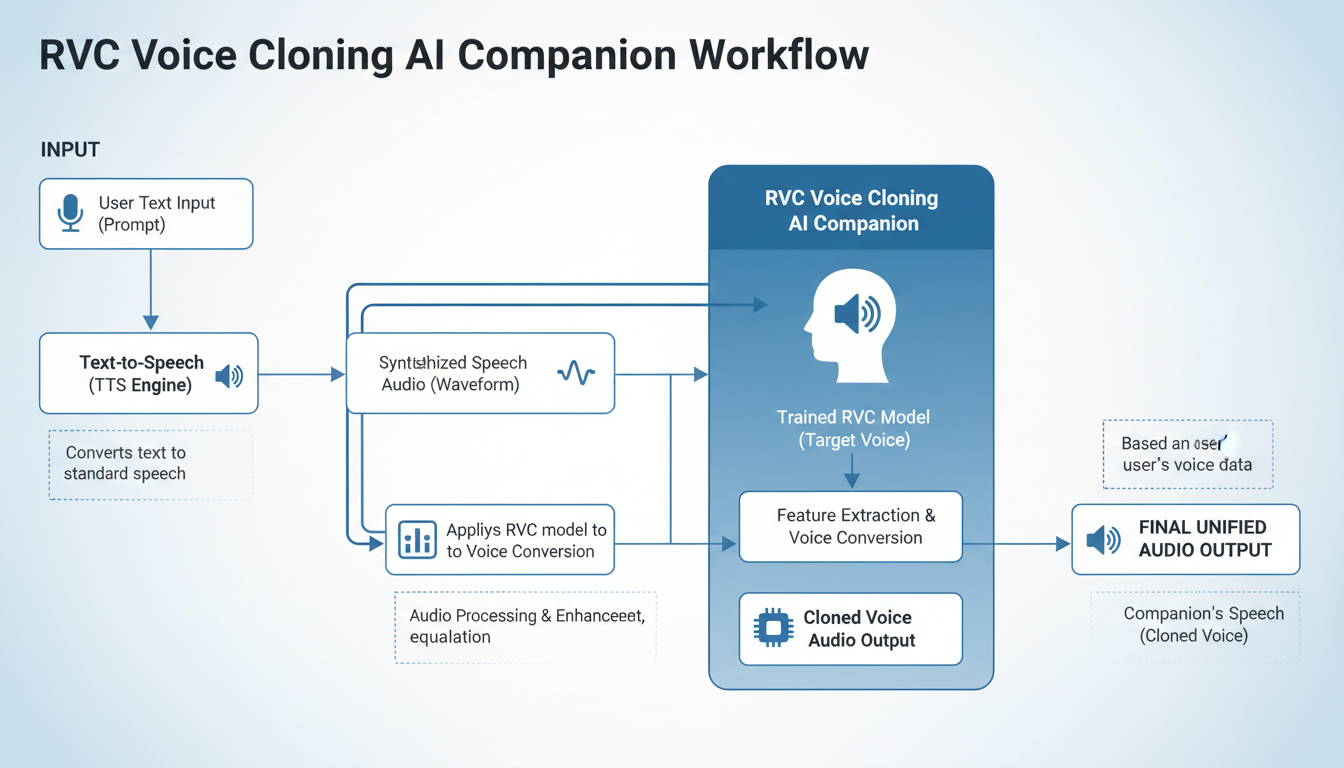
Text-to-Speech Pipeline
Most AI companions use text responses. Converting these to voiced audio requires:
- TTS Engine: Converts text to speech (edge-tts, Tortoise-TTS, XTTS)
- RVC Conversion: Transforms TTS output to your character voice
- Playback: Delivers audio to user
For the TTS engine, consider:
- Edge-TTS: Fast, free, decent quality. Good starting point.
- XTTS: Higher quality, slower, runs locally.
- ElevenLabs: Excellent quality, paid service.
Automation Setup
Create a pipeline that automatically voices AI responses:
# Pseudocode for voice pipeline
def voice_response(text):
    # Generate speech with TTS
    tts_audio = tts_engine.synthesize(text)

    # Convert to character voice
    character_audio = rvc_model.convert(tts_audio)

    # Play to user
    audio_player.play(character_audio)
Actual implementation depends on your specific tools and AI companion platform.
Latency Optimization
Real-time voice adds latency to conversations. Minimize delays through:
- Chunked processing (convert while generating)
- Hardware acceleration
- Optimized model sizes
- Caching common phrases
Acceptable latency for conversations is under 500ms. Users perceive delays over 1 second as disruptive.
Advanced Techniques
Once basics work, these techniques improve quality and versatility.
Multi-Emotion Training
Train separate models for different emotional states:
- Happy/excited voice model
- Calm/comforting voice model
- Serious/concerned voice model
Switch models based on detected emotion in AI responses. Creates more nuanced character expression.
Voice Blending
Combine multiple RVC models for unique voices:
- Layer two models at different strengths
- Create voices that don't exist in training data
- Useful for fictional characters
Singing Voice
RVC handles singing differently than speech. For musical content:
- Train on singing samples specifically
- Use different pitch settings
- Consider separate singing models
Common Problems and Solutions
Metallic or Robotic Sound
Cause: Insufficient training, poor audio quality, or wrong settings.
Solutions:
- Train for more epochs
- Improve training audio quality
- Reduce index ratio
- Try different extraction method (harvest vs rmvpe)
Pitch Issues
Cause: Mismatch between input and target voice pitch.
Solutions:
- Adjust pitch shift parameter
- Use TTS voice closer to target pitch
- Retrain with pitch-augmented data
Words Getting Lost
Cause: Over-aggressive conversion losing consonants.
Solutions:
- Increase protect parameter
- Reduce index ratio
- Improve training audio clarity
Inconsistent Quality
Cause: Varied training data quality or insufficient variety.
Solutions:
- Curate training data more carefully
- Add more diverse samples
- Balance emotion/volume in training set
Frequently Asked Questions
How much audio do I need to train an RVC model?
10-30 minutes of clean audio produces good results. More data helps but with diminishing returns. Quality matters more than quantity.
Can I clone any voice with RVC?
Technically yes, but ethical and legal considerations apply. Only clone voices you have permission to use. Never clone voices for impersonation or fraud.
Does RVC work in real-time?
Yes, with approximately 100-300ms latency depending on hardware. Dedicated apps like Voice Changer optimize for realtime use.
What GPU do I need for RVC?
6GB VRAM minimum for basic training and conversion. 8GB+ recommended for comfortable operation. AMD GPUs work but NVIDIA is better supported.
How long does training take?
30 minutes to 3 hours depending on data amount, epochs, and hardware. Most models train in 1-2 hours.
Can I use RVC commercially?
The RVC license permits research and personal use. Commercial use has restrictions. Check current license terms and consider voice actor rights for training data.
How do I improve conversion quality?
Better training audio, more epochs, proper settings tuning, and the right index ratio all improve quality. Experimentation required for best results.
Does RVC preserve emotion from input audio?
Yes, emotional qualities transfer from input to output. This is one of RVC's strengths over pure TTS systems.
Next Steps
With voice cloning working, consider these enhancements:
- Train emotion-specific models for more expressive character
- Set up automated voice pipeline for AI companions
- Explore realtime conversion for live interactions
- Combine with AI girlfriend visual generation for complete character
- Consider streaming and monetization options
Voice brings AI characters to life in ways text cannot match. The technology continues improving rapidly, with new models and methods appearing regularly. Start with basics covered here, then explore latest developments as you master fundamentals.
For comprehensive AI companion creation, combine voice with visual consistency techniques to create characters that look and sound exactly as you envision them.
Ready to Create Your AI Influencer?
Join 115 students mastering ComfyUI and AI influencer marketing in our complete 51-lesson course.
Related Articles

AI Art Market Statistics 2025: Industry Size, Trends, and Growth Projections
Comprehensive AI art market statistics including market size, creator earnings, platform data, and growth projections with 75+ data points.

AI Automation Tools: Transform Your Business Workflows in 2025
Discover the best AI automation tools to transform your business workflows. Learn how to automate repetitive tasks, improve efficiency, and scale operations with AI.
AI Avatar Generator: I Tested 15 Tools for Profile Pictures, Gaming, and Social Media in 2026
Comprehensive review of the best AI avatar generators in 2026. I tested 15 tools for profile pictures, 3D avatars, cartoon styles, gaming characters, and professional use cases.