NSFW AI Prompt Examples: Professional Prompting Guide for Adult Content 2025
Effective prompting techniques for NSFW AI image generation. Real examples, style control, and professional results for adult content creation.
The difference between amateur and professional AI-generated adult content is prompting. Same models, same settings—dramatically different results. Good prompts produce gallery-worthy images. Bad prompts produce obvious AI garbage.
Quick Answer: Effective NSFW prompts follow this structure: quality tags first, subject description, physical details, pose/action, setting, style modifiers. Always include comprehensive negative prompts. Use model-specific conventions (danbooru tags for anime, natural language for realistic). Start simple, add complexity based on results.
- Prompt structure matters more than length
- Quality tags at the beginning dramatically improve output
- Negative prompts are equally important as positive
- Different models require different prompting styles
- Simple, focused prompts often beat complex ones
- Testing and iteration are essential
Prompting Fundamentals
Before exploring examples, understand the principles:
How AI Prompts Work
When you write a prompt, the AI:
- Tokenizes your text (breaks into understandable pieces)
- Weights tokens by position (earlier = stronger influence)
- Cross-references training data associations
- Generates based on combined signals
Key insight: Position matters. Put important things first.
The Basic Structure
[quality] + [subject] + [details] + [pose/action] + [setting] + [style]
Each component contributes to the final image. Missing components leave the AI to guess—sometimes well, sometimes poorly.
Token Weighting
Most interfaces support emphasis:
(word)- Slightly more emphasis((word))- More emphasis(word:1.3)- 30% more weight[word]- Less emphasis (some interfaces)
Use sparingly. Over-weighting breaks images.
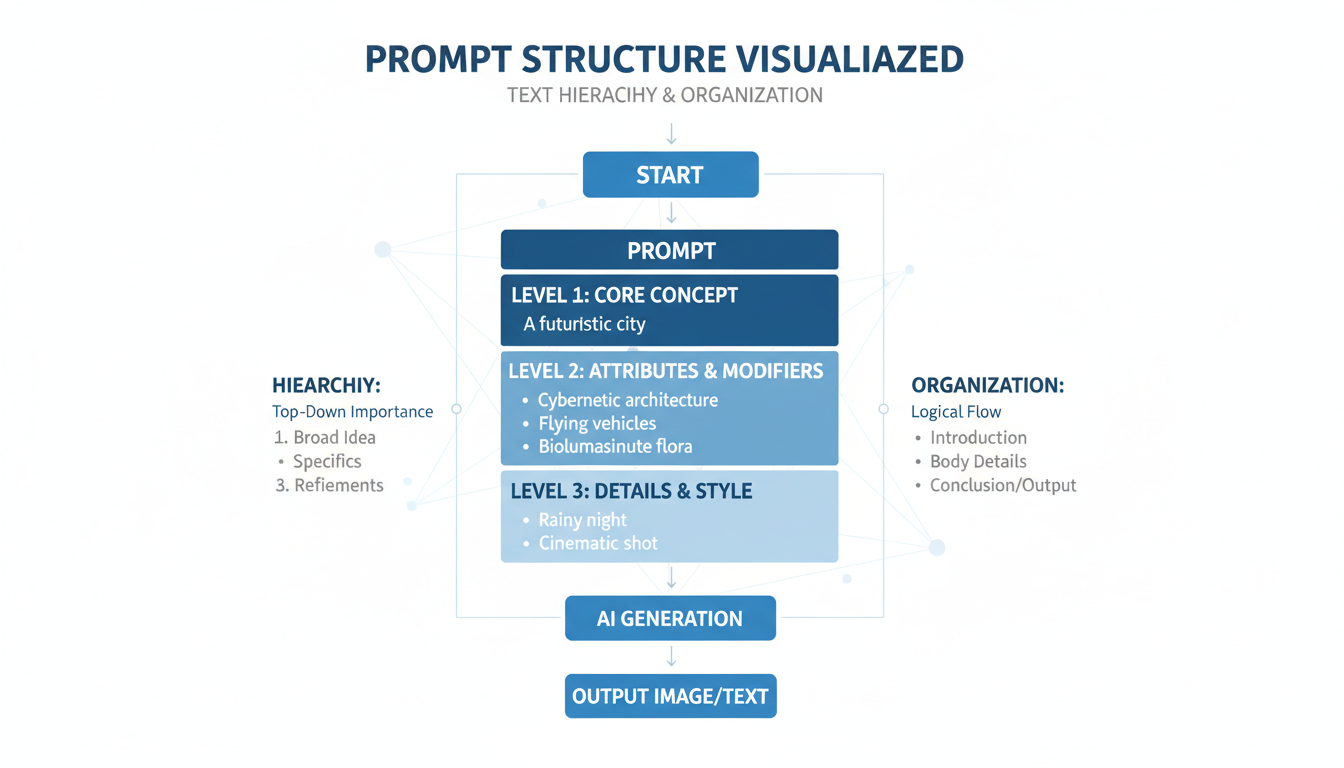 Proper prompt structure produces better results
Quality Tags
Start every prompt with quality indicators:
Universal Quality Tags
masterpiece, best quality, high resolution, detailed
These tell the AI you want its best output, not average results.
Realistic Content
photorealistic, hyperrealistic, professional photography, 8k uhd, sharp focus, detailed skin, natural lighting
Anime/Stylized Content
masterpiece, best quality, absurdres, highres, incredibly detailed, anime style
What to Avoid
Don't use: amazing, beautiful, gorgeous (too vague)
Do use: specific quality descriptors
Subject Description
Describe who/what you're generating:
Single Subject
1woman, 1girl, solo
1man, 1boy, solo
Specifying "solo" helps prevent extra figures.
Physical Attributes
Age indicators (always adult):
mature, adult, woman, milf
Body type:
slim, athletic, curvy, petite, muscular, voluptuous
Features:
blonde hair, long hair, wavy hair
blue eyes, green eyes, brown eyes
fair skin, tan skin, dark skin
Example Descriptions
Realistic:
1woman, adult, blonde hair, blue eyes, slim athletic body, fair skin
Anime:
1girl, long pink hair, red eyes, medium breasts, slim waist
Pose and Action
Guide the composition:
Basic Poses
standing, sitting, lying down, kneeling
from front, from side, from behind
full body, upper body, portrait, cowboy shot
looking at viewer, looking away, looking up
Dynamic Poses
leaning forward, arching back, stretching
arms up, hands on hips, crossed arms
one leg raised, spreading legs
Specific Actions
For NSFW content, be specific about desired actions. Vague prompts get vague results.
Clothing and States
Control what subjects wear (or don't):
Clothing Options
nude, naked, completely nude
bikini, lingerie, underwear only
partially undressed, topless, bottomless
dress, shirt, jeans, skirt
see-through, wet clothing
State Descriptors
wet, sweaty, oiled
disheveled, messy hair
flushed, blushing
Setting and Background
Context improves images:
Indoor Settings
bedroom, living room, bathroom, kitchen
on bed, on couch, in shower
hotel room, office, studio
Outdoor Settings
beach, pool, garden, park
nature, forest, mountain
urban, street, rooftop
Lighting
natural lighting, golden hour, sunset
soft lighting, dramatic lighting, rim lighting
studio lighting, neon lighting
window light, candlelight
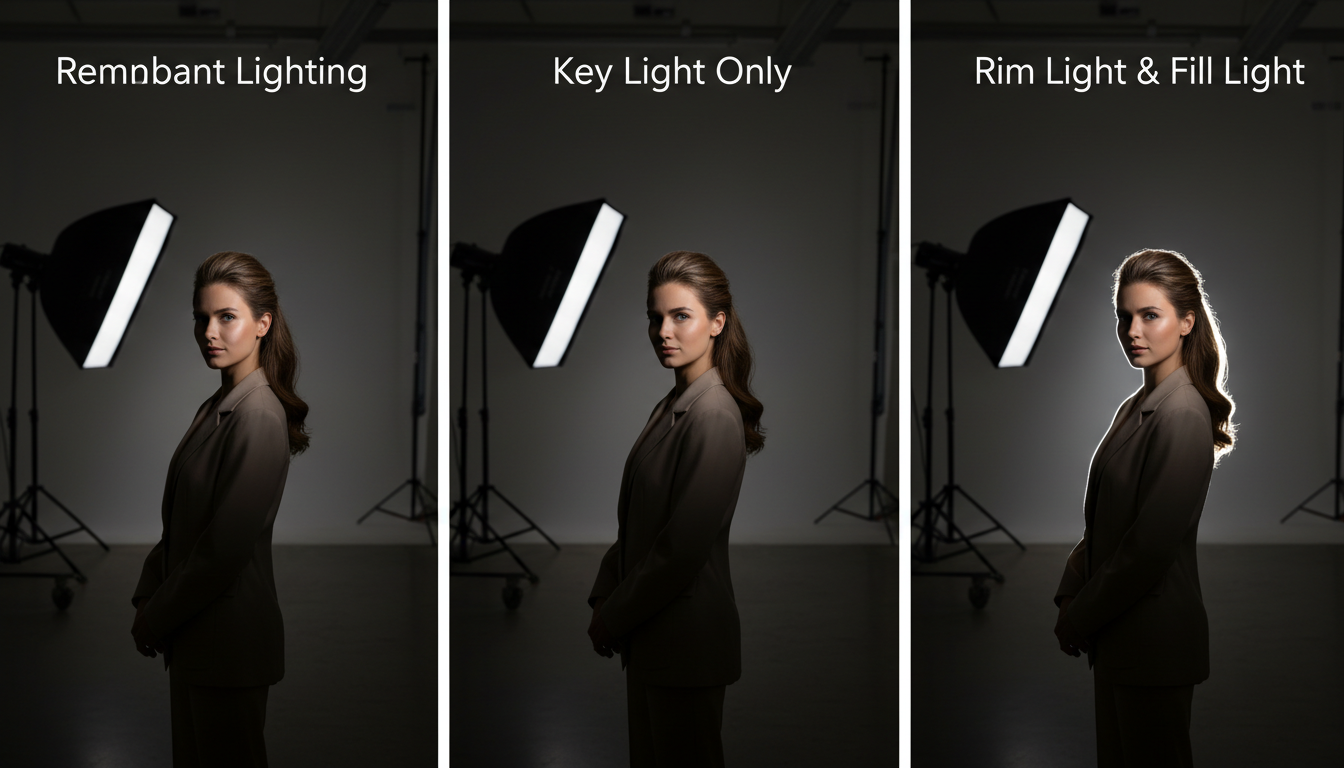 Lighting dramatically changes the feel of generated images
Free ComfyUI Workflows
Find free, open-source ComfyUI workflows for techniques in this article. Open source is strong.
Model-Specific Prompting
Different models need different approaches:
Realistic Models (CyberRealistic, Realistic Vision)
Use: Natural language, photography terms, detailed descriptions
professional photograph of a beautiful adult woman with flowing brown hair, wearing a white sundress, standing in a sunlit meadow, golden hour lighting, shallow depth of field, 85mm lens, photorealistic, hyperdetailed skin texture
Key elements:
- Photography terms (lens, aperture, etc.)
- Natural language flow
- Specific physical descriptions
- Lighting specifications
Pony Diffusion / Anime Models
Use: Danbooru tags, comma-separated, specific conventions
masterpiece, best quality, 1girl, solo, long silver hair, red eyes, large breasts, nude, lying on bed, bedroom, from above, looking at viewer, seductive smile, detailed lighting
Key elements:
- Danbooru-style tags
- Comma separation
- Booru-specific terms
- Position/angle tags
SDXL Models
Use: Hybrid approach, more natural language
masterpiece quality digital art of an attractive adult woman, flowing auburn hair, emerald green eyes, athletic body, wearing black lace lingerie, sitting on velvet chair, moody ambient lighting, high detail, professional composition
Negative Prompts
What NOT to include is equally important:
Essential Negative Prompts
lowres, bad anatomy, bad hands, text, error, missing fingers, extra digit, fewer digits, cropped, worst quality, low quality, normal quality, jpeg artifacts, signature, watermark, username, blurry
Anatomy-Focused Negatives
bad anatomy, bad hands, bad feet, poorly drawn hands, poorly drawn face, mutation, deformed, extra limbs, extra arms, extra legs, malformed limbs, fused fingers, too many fingers, long neck, cross-eyed, mutated hands
NSFW-Specific Negatives
child, minor, underage, teen, young, censored, mosaic, blur, out of frame, amputee, disfigured
Complete Negative Example
lowres, bad anatomy, bad hands, text, error, missing fingers, extra digit, fewer digits, cropped, worst quality, low quality, normal quality, jpeg artifacts, signature, watermark, username, blurry, bad feet, poorly drawn hands, poorly drawn face, mutation, deformed, extra limbs, extra arms, extra legs, malformed limbs, fused fingers, too many fingers, long neck, cross-eyed, mutated hands, polar lowres, bad body, bad proportions, gross proportions, child, underage, censored
Complete Prompt Examples
Example 1: Realistic Bedroom Scene
Positive:
professional photograph, photorealistic, 8k uhd, 1woman, adult, beautiful, long wavy brown hair, hazel eyes, slim body, fair skin, completely nude, lying on white bedsheets, bedroom, morning light through window, soft natural lighting, detailed skin texture, sharp focus, looking at viewer
Negative:
lowres, bad anatomy, bad hands, text, error, missing fingers, extra digit, fewer digits, cropped, worst quality, low quality, jpeg artifacts, signature, watermark, blurry, poorly drawn face, mutation, deformed, extra limbs, child, underage, censored
Example 2: Anime Style
Positive:
masterpiece, best quality, absurdres, 1girl, solo, long pink hair, twintails, red eyes, large breasts, slim waist, completely nude, sitting on bed, bedroom, from front, looking at viewer, slight smile, blush, detailed lighting, anime style
Negative:
Want to skip the complexity? Apatero gives you professional AI results instantly with no technical setup required.
lowres, bad anatomy, bad hands, text, error, missing fingers, worst quality, low quality, jpeg artifacts, signature, watermark, blurry, poorly drawn, mutation, deformed, extra limbs, child, censored
Example 3: Artistic/Stylized
Positive:
digital art, masterpiece, 1woman, adult, platinum blonde short hair, blue eyes, athletic body, tasteful nude, artistic pose, minimalist studio background, dramatic side lighting, high contrast, professional art photography style, elegant, sophisticated
Negative:
lowres, bad anatomy, text, error, worst quality, low quality, blurry, vulgar, explicit, child, underage
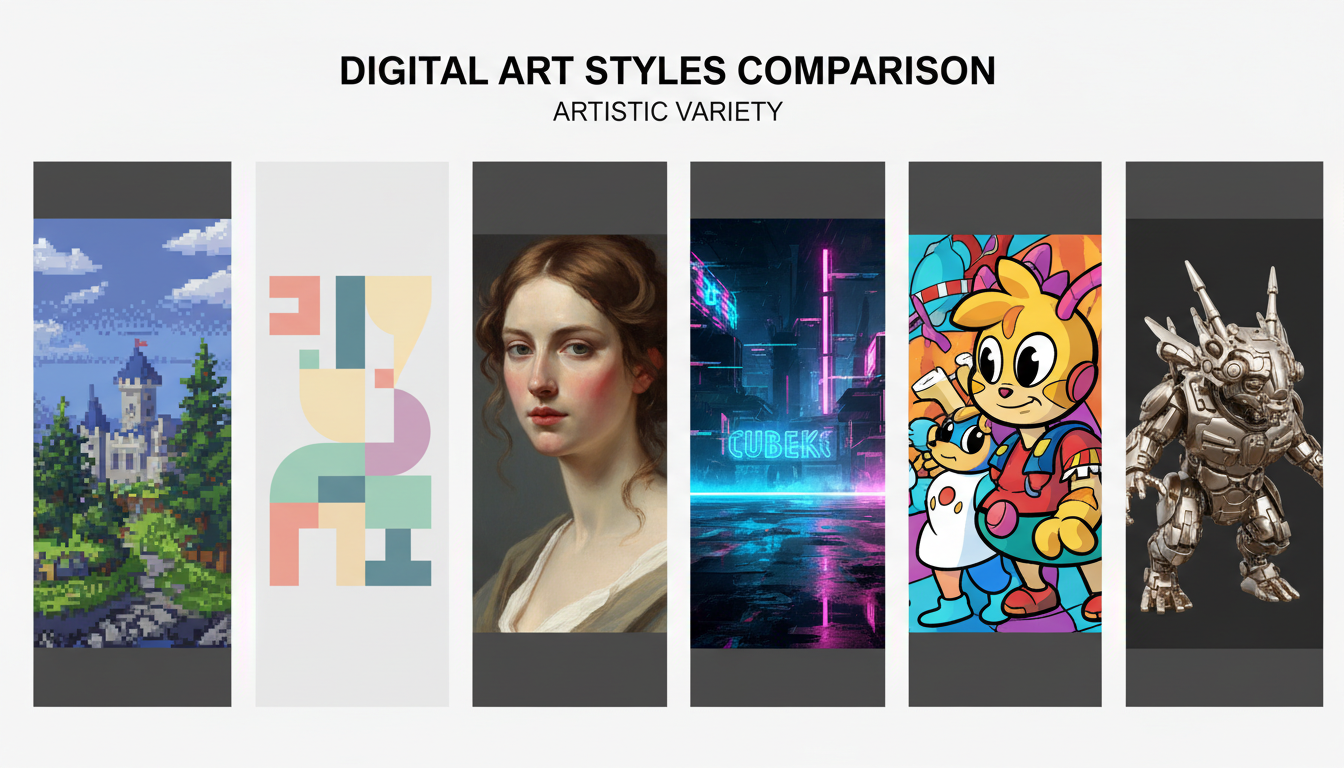 The same subject can be rendered in many styles
Advanced Techniques
Regional Prompting
Some interfaces support focusing prompts on image regions:
- Face-specific details in face region
- Body details in body region
- Background in background region
Prompt Mixing
Combine concepts:
(blonde hair:0.7), (red hair:0.3)
Creates strawberry blonde effect.
Style Transfer
Reference specific aesthetics:
in the style of renaissance painting
cinematic color grading
anime screencap aesthetic
ControlNet Integration
Combine prompts with pose/composition control:
- OpenPose for exact positioning
- Depth for spatial relationships
- Canny for edge guidance
Common Mistakes
Mistake 1: Too Many Concepts
Bad:
beautiful gorgeous sexy attractive stunning woman with long flowing silky smooth blonde hair and mesmerizing deep blue eyes with perfect skin...
Good:
Earn Up To $1,250+/Month Creating Content
Join our exclusive creator affiliate program. Get paid per viral video based on performance. Create content in your style with full creative freedom.
masterpiece, 1woman, adult, long blonde hair, blue eyes, attractive, detailed
Less is often more. Let the model fill in details.
Mistake 2: Contradictory Terms
Bad:
realistic anime style photorealistic cartoon
Pick a style direction and commit to it.
Mistake 3: Ignoring Negatives
Good negatives prevent 80% of common issues. Never skip them.
Mistake 4: Wrong Model Conventions
Danbooru tags in realistic models or natural language in anime models both produce suboptimal results. Match your prompting style to your model.
Mistake 5: Over-Weighting
Bad:
((((extremely detailed))))
This breaks the image. Use modest emphasis when needed.
Prompt Templates
Copy and customize these templates:
Realistic Portrait
professional photograph, photorealistic, 8k uhd, 1woman, adult, [hair color] hair, [eye color] eyes, [body type] body, [skin tone] skin, [clothing/state], [pose], [setting], [lighting], detailed skin texture, sharp focus

Negative: lowres, bad anatomy, bad hands, text, error, worst quality, low quality, blurry, poorly drawn, mutation, deformed, child, underage, censored
Anime Character
masterpiece, best quality, absurdres, 1girl, solo, [hair description], [eye color] eyes, [body description], [clothing/state], [pose], [setting], [camera angle], detailed lighting, anime style

Negative: lowres, bad anatomy, text, error, worst quality, low quality, blurry, poorly drawn, mutation, deformed, child, censored
Artistic/Tasteful
digital art, masterpiece, professional, 1woman, adult, [description], [artistic pose], [setting], [lighting style], elegant composition, sophisticated

Negative: lowres, text, error, worst quality, low quality, blurry, vulgar, child, underage
Platform-Specific Notes
Local Stable Diffusion
Full control over prompts. Use appropriate syntax for your interface (A1111 vs ComfyUI).
Apatero
Simplified prompting with style presets. Character consistency maintained automatically. Good for production without deep prompting knowledge.
NovelAI
Anime-focused, supports danbooru tags natively. Has unique prompt preprocessing.
Testing and Iteration
Prompting is iterative:
- Start simple - Basic prompt, see what you get
- Identify issues - What's wrong or missing?
- Targeted additions - Add specific fixes
- Test negatives - Add if needed
- Refine and repeat - Iterate toward desired result
Keep notes. Document what works for your models and use cases.
Frequently Asked Questions
How long should prompts be?
Quality over quantity. 50-100 tokens is usually sufficient. Very long prompts often hurt rather than help.
Does capitalization matter?
Generally no. Most tokenizers normalize case. Focus on word choice instead.
How do I get consistent characters?
Prompts alone can't ensure consistency. Use IPAdapter, trained LoRAs, or platforms like Apatero with built-in character features.
Why do my images look different from examples?
Model version, settings (CFG, sampler, steps), and seed all affect output. Match all parameters for reproduction.
Can I use celebrity names?
Generally produces likeness, but raises ethical/legal issues. Create original characters instead.
Quick Reference
Quality starters:
- Realistic:
professional photograph, photorealistic, 8k uhd - Anime:
masterpiece, best quality, absurdres
Essential negatives:
lowres, bad anatomy, worst quality, low quality, blurrychild, underage, censored(for NSFW)
Structure: Quality → Subject → Details → Pose → Setting → Style
Remember: Test, iterate, refine. No prompt is perfect on first try.
Related guides: Stable Diffusion NSFW Settings, AI Hentai Generation Guide, Character Consistency Guide
Ready to Create Your AI Influencer?
Join 115 students mastering ComfyUI and AI influencer marketing in our complete 51-lesson course.
Related Articles

AI Art Market Statistics 2025: Industry Size, Trends, and Growth Projections
Comprehensive AI art market statistics including market size, creator earnings, platform data, and growth projections with 75+ data points.

AI Automation Tools: Transform Your Business Workflows in 2025
Discover the best AI automation tools to transform your business workflows. Learn how to automate repetitive tasks, improve efficiency, and scale operations with AI.
AI Avatar Generator: I Tested 15 Tools for Profile Pictures, Gaming, and Social Media in 2026
Comprehensive review of the best AI avatar generators in 2026. I tested 15 tools for profile pictures, 3D avatars, cartoon styles, gaming characters, and professional use cases.