AI Voice Cloning for Adult Content: Complete Audio Integration Guide 2025
How to add AI voice to your virtual influencer content. Voice cloning, text-to-speech, audio integration, and creating authentic voice experiences.
Voice transforms AI influencers from images to personas. Pictures catch attention. Voice creates intimacy. The difference between a character people look at and one they feel connected to often comes down to audio. AI voice technology now makes this accessible to every creator.
Quick Answer: For AI voice in adult content, use ElevenLabs (highest quality, commercial licensing) or Fish Speech (free, open source). Clone a voice from reference audio, integrate with your content through voice messages, video voiceovers, and personalized audio. Voice messages increase subscriber retention significantly and enable new revenue streams like audio content and calls.
- Voice adds intimacy that images alone can't create
- ElevenLabs offers best quality, Fish Speech is best free option
- Voice messages significantly increase subscriber engagement
- Audio-only content is an additional revenue stream
- Character voice should match visual personality
- Legal and ethical considerations apply to voice use
Why Voice Matters for AI Influencers
The Intimacy Factor
Images alone:
- Visual attraction
- Surface-level connection
- One-way communication feeling
- Easily replaced by competitors
Images + voice:
- Deeper personal connection
- Feeling of real relationship
- More intimate experience
- Stronger subscriber loyalty
Engagement Impact
Creators adding voice report:
- Higher message response rates
- Increased retention
- More tips and PPV purchases
- Stronger fan relationships
- Premium pricing acceptance
Revenue Opportunities
New income streams:
- Voice messages (PPV)
- Audio-only content
- ASMR-style recordings
- Personalized audio (name, scenarios)
- Voice calls (emerging platforms)
 Voice creates deeper connections with subscribers
Voice Technology Options
ElevenLabs (Recommended)
The industry leader for voice cloning.
Strengths:
- Highest quality output
- Easy to use
- Commercial licensing available
- Fast generation
- Multiple voice options
- Emotional control
Pricing:
- Free tier: Limited characters
- Starter: $5/month
- Creator: $22/month
- Pro: $99/month
Best for: Serious creators wanting best quality
Fish Speech (Open Source)
Best free option with local operation.
Strengths:
- Completely free
- Run locally (privacy)
- No usage limits
- Good quality
- Active development
Requirements:
- Technical setup
- GPU for best performance
- Self-hosting
Best for: Technical users, privacy focus, budget constraint
CosyVoice
Strong multilingual option.
Strengths:
- Excellent language support
- Good emotion control
- Open source
- Active Chinese development
Best for: Non-English content, multilingual characters
Other Options
Amazon Polly: Reliable, less natural Google Cloud TTS: Good quality, cloud-based Tortoise TTS: Open source, slow but quality XTTS: Coqui's fast open source option
Comparison Table
| Tool | Quality | Price | Setup | NSFW Friendly |
|---|---|---|---|---|
| ElevenLabs | Excellent | $5-99/mo | Easy | Policy-dependent |
| Fish Speech | Very Good | Free | Technical | Yes (local) |
| CosyVoice | Very Good | Free | Technical | Yes (local) |
| XTTS | Good | Free | Technical | Yes (local) |
Creating Your Character's Voice
Choosing Voice Characteristics
Match visual identity:
- Youthful look = youthful voice
- Mature appearance = appropriate voice
- Personality should shine through
Consider:
- Pitch (higher/lower)
- Tone (warm/cool)
- Energy (calm/energetic)
- Accent if appropriate
- Speaking pace
Option 1: Clone from Reference
Process:
- Find voice samples that match your vision
- Collect 1-5 minutes of clean audio
- Upload to cloning service
- Generate test outputs
- Refine if needed
Where to find reference voices:
- Voice actors on platforms (get permission)
- AI-generated base voices
- Public domain recordings
- Your own voice (modified)
Quality tips:
- Clean audio (no background noise)
- Varied speech patterns
- Multiple emotions represented
- Clear enunciation
Option 2: Use Existing AI Voices
ElevenLabs library:
- Pre-made professional voices
- Many styles available
- Immediately usable
- Good for starting
Considerations:
- Less unique than cloned
- Other creators might use same
- Still high quality
Option 3: Create Custom Voice
Advanced approach:
- Mix characteristics from multiple sources
- Modify existing voices
- Train custom models (technical)
For most creators: Options 1 or 2 are sufficient.
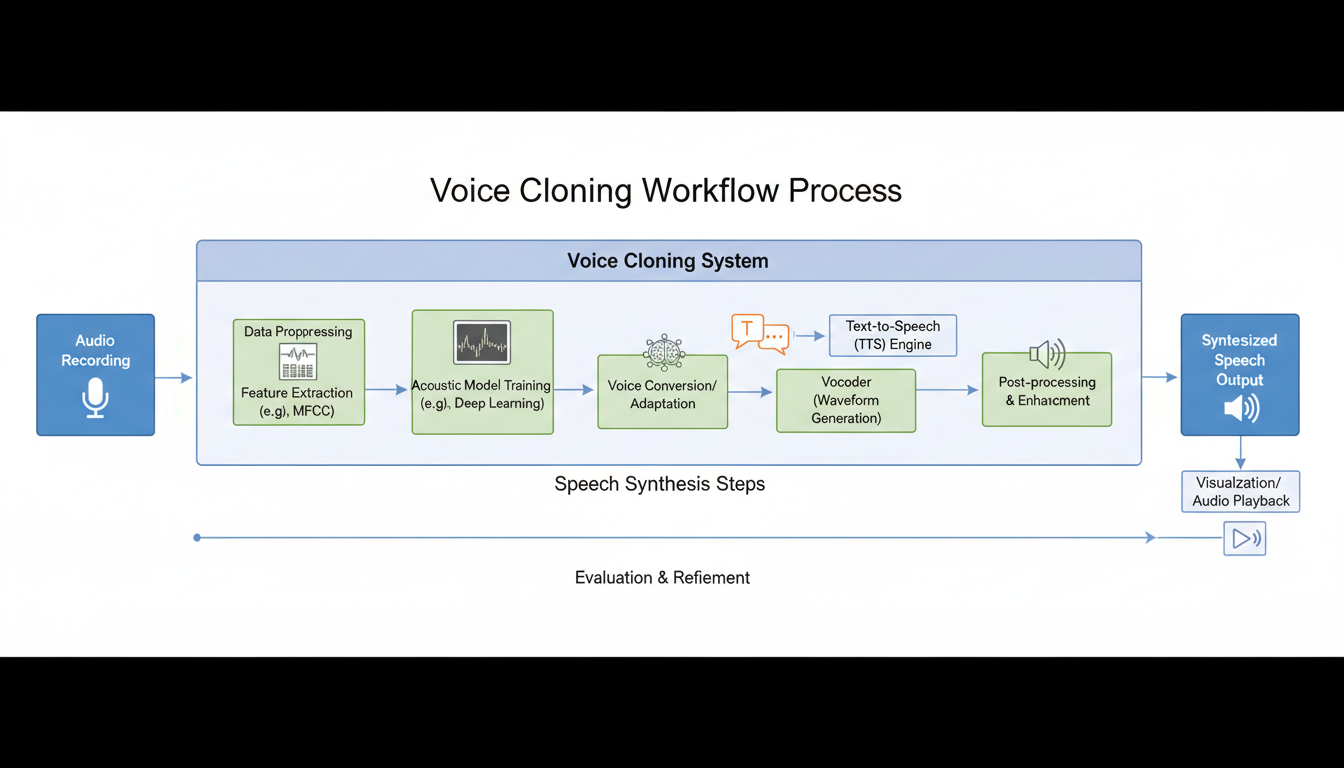 Creating your character's voice is a key step
Integrating Voice into Content
Voice Messages
Most impactful use:
Free ComfyUI Workflows
Find free, open-source ComfyUI workflows for techniques in this article. Open source is strong.
- Personal messages to subscribers
- Welcome messages for new subscribers
- Thank you for tips/purchases
- Special occasion greetings
Workflow:
- Write message script
- Generate audio with voice tool
- Send via platform messaging
- Or attach to images/content
Tips:
- Keep messages personal
- Use subscriber names when possible
- Match tone to character
- 30-60 seconds optimal length
Video Voiceovers
Add voice to generated videos:
- Narration over content
- Character speaking
- Storytelling format
Process:
- Generate video content
- Write script for audio
- Generate voice audio
- Sync audio to video
- Adjust timing as needed
Tools for syncing:
- CapCut (free, easy)
- DaVinci Resolve (free, professional)
- Premiere Pro (paid, full-featured)
Audio-Only Content
Revenue opportunity:
- ASMR style recordings
- Roleplay audio
- Personalized audio messages
- Audio stories
Format:
- 5-30 minute recordings
- Can be PPV or subscription bonus
- Lower production than video
- Higher margin
Lip Sync for Talking Videos
Advanced technique:
- Generate talking head video
- Character appears to speak
- More technical to execute
Tools:
- SadTalker
- Wav2Lip
- Various emerging tools
Considerations:
- Quality varies
- Processing time required
- May need post-production
Platform Integration
Fanvue
Voice capabilities:
- Audio message support
- Voice notes in DMs
- Audio content posts
Best practices:
- Regular voice messages
- Audio PPV content
- Personalized greetings
Fansly
Voice capabilities:
- Audio file uploads
- DM audio messages
- Story audio
Best practices:
Want to skip the complexity? Apatero gives you professional AI results instantly with no technical setup required.
- Same as Fanvue
- Consistency across platforms
Social Media
Where voice helps:
- TikTok/Reels voiceovers
- Instagram stories
- Twitter voice tweets
Considerations:
- Keep SFW for mainstream platforms
- Voice builds character recognition
- Cross-platform consistency
Quality and Authenticity
What Makes Voice Convincing
Natural patterns:
- Breathing sounds
- Slight hesitations
- Emotional variation
- Realistic pacing
Avoid:
- Too perfect/robotic
- Monotone delivery
- Unnatural pauses
- Same emotion always
Matching Voice to Character
Consistency matters:
- Voice personality matches visual
- Communication style aligns
- Vocabulary is appropriate
- Energy level consistent
Testing Your Voice
Before public use:
- Generate multiple samples
- Test different emotions
- Get feedback if possible
- Compare to character concept
- Adjust parameters as needed
 Quality voice enhances the overall experience
Workflow Examples
Daily Voice Message Workflow
Time required: 15-30 minutes daily
Process:
- Morning: Write 3-5 message scripts
- Generate audio for each
- Review and select best takes
- Schedule or send immediately
- Personalize for top subscribers
Video Content Workflow
Time required: 1-2 hours per video
Process:
- Generate or select video content
- Write voiceover script
- Generate voice audio
- Sync in video editor
- Add music/effects if desired
- Export and upload
Audio Content Production
Time required: 30-60 minutes per piece
Process:
Earn Up To $1,250+/Month Creating Content
Join our exclusive creator affiliate program. Get paid per viral video based on performance. Create content in your style with full creative freedom.
- Plan content type (ASMR, story, etc.)
- Write full script
- Generate in sections
- Edit together in audio software
- Add ambient sounds if appropriate
- Export as final product
Common Issues and Solutions
Issue: Voice Sounds Robotic
Causes:
- Poor source audio
- Wrong tool settings
- Inappropriate voice choice
Fixes:
- Better reference audio
- Adjust speaking speed
- Try different voice
- Add subtle processing
Issue: Voice Doesn't Match Character
Causes:
- Mismatch in age/personality
- Wrong pitch/tone
- Inconsistent energy
Fixes:
- Select different base voice
- Adjust voice parameters
- Consider character redesign
- Test multiple options
Issue: Audio Quality Problems
Causes:
- Low-quality generation
- Poor export settings
- Compression issues
Fixes:
- Higher quality settings
- Proper file formats
- Minimal compression
- Check platform requirements
Issue: Lip Sync Issues
Causes:
- Timing mismatch
- Quality degradation
- Wrong tool for task
Fixes:
- Manual adjustment
- Better sync tools
- Lower expectations (it's hard)
Legal and Ethical Considerations
Voice Rights
Important:
- Don't clone real people without consent
- Commercial use requires proper licensing
- Platform terms may restrict
- Document your voice source
Disclosure
Best practices:
- Don't claim to be human if asked directly
- Be honest about AI nature when appropriate
- Follow platform guidelines
- Maintain ethical boundaries
Content Restrictions
What's allowed:
- Original character voices
- Properly licensed AI voices
- Consensual adult content
What's not:
- Impersonating real people
- Non-consensual scenarios
- Content depicting minors
Cost Analysis
ElevenLabs Cost Example
Creator tier ($22/month):
- ~100,000 characters/month
- Approximately 2-3 hours of audio
- 60+ voice messages
- Multiple video voiceovers
For most creators: Creator tier sufficient
Free Alternative Setup
Fish Speech (free):
- Requires: GPU computer
- One-time: Setup time (2-4 hours)
- Ongoing: Electricity, maintenance
- Unlimited: Generation volume
Total cost: $0 ongoing (if you have hardware)
ROI Consideration
Investment: $22-100/month for voice tools Return: Increased retention, new revenue streams Break-even: 2-3 additional subscribers typically
Advanced Techniques
Emotion Variation
For realistic delivery:
- Generate same line with different emotions
- Mix and match in editing
- Create emotional range
- Match to content mood
Background Enhancement
Polish audio:
- Add subtle room ambiance
- Light music if appropriate
- Post-processing for warmth
- Remove artifacts
Personalization at Scale
For high-volume creators:
- Template-based messages
- Name insertion points
- Batch generation
- Semi-automated workflow
Frequently Asked Questions
Which tool should I start with?
ElevenLabs for ease and quality. Fish Speech if you're technical and want free.
How much audio do I need to create?
Start with 5-10 messages daily. Scale based on subscriber volume and engagement.
Can I use AI voice for calls?
Emerging but limited. Real-time AI voice is possible but challenging. Pre-recorded works better currently.
Do subscribers know it's AI?
Some may suspect. Be honest if directly asked. Most accept AI voices for virtual characters.
What about different languages?
ElevenLabs and CosyVoice both support multiple languages. Quality varies by language.
How do I handle voice requests I can't fulfill?
Set clear boundaries. Some requests may be inappropriate. Have template responses ready.
Getting Started Checklist
Week 1: Setup
- Choose voice tool (ElevenLabs or Fish Speech)
- Create or select character voice
- Generate test messages
- Adjust voice as needed
- Plan content strategy
Week 2: Integration
- Create welcome message audio
- Add voice to 3-5 content pieces
- Send first voice messages to subscribers
- Gather feedback
- Refine approach
Ongoing
- Daily voice messages
- Weekly audio content
- Regular video voiceovers
- Continuous quality improvement
- Expand usage as comfortable
Final Thoughts
Voice is the bridge between AI images and believable personas. It creates intimacy, increases engagement, and opens new revenue streams. The technology is mature enough for professional use.
Start with ElevenLabs if you want quality and simplicity. Use Fish Speech if you prefer local control and free operation. Either way, adding voice to your virtual influencer content is one of the highest-impact improvements you can make.
Your character gains a voice. Your subscribers gain a connection. Your business gains retention and revenue.
Related guides: Text-to-Speech Voice Cloning, AI Girlfriend Creation Guide, AI Influencer Money-Making Guide
Ready to Create Your AI Influencer?
Join 115 students mastering ComfyUI and AI influencer marketing in our complete 51-lesson course.
Related Articles

AI Art Market Statistics 2025: Industry Size, Trends, and Growth Projections
Comprehensive AI art market statistics including market size, creator earnings, platform data, and growth projections with 75+ data points.

AI Automation Tools: Transform Your Business Workflows in 2025
Discover the best AI automation tools to transform your business workflows. Learn how to automate repetitive tasks, improve efficiency, and scale operations with AI.
AI Avatar Generator: I Tested 15 Tools for Profile Pictures, Gaming, and Social Media in 2026
Comprehensive review of the best AI avatar generators in 2026. I tested 15 tools for profile pictures, 3D avatars, cartoon styles, gaming characters, and professional use cases.