Character Turnaround Sheets: AI Generation Complete Guide 2025
Create consistent character turnaround sheets with AI. Learn to generate front, side, and back views with perfect consistency using Flux Kontext, ControlNet, and specialized tools.
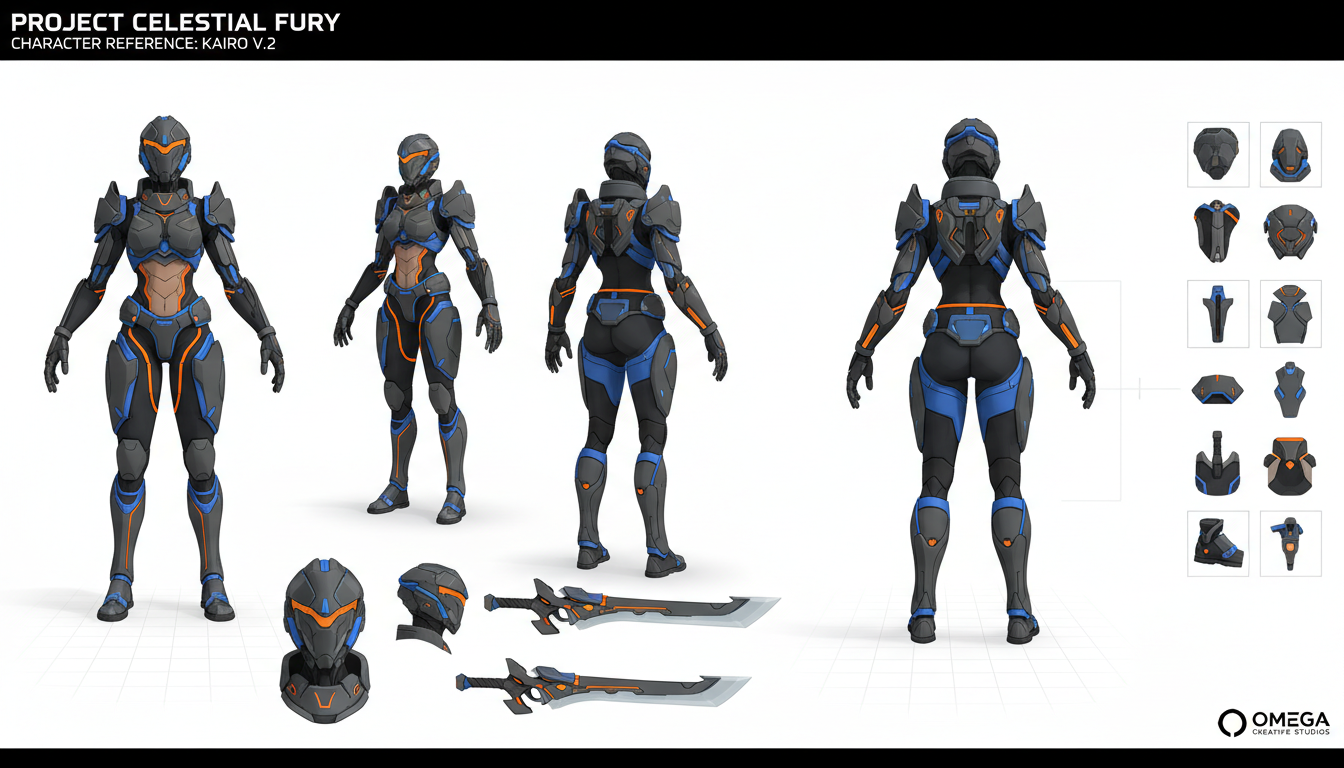
Character turnaround sheets are the backbone of animation and game development pipelines. AI can now generate these multi-view references with remarkable consistency—if you know the right techniques.
Quick Answer: Generate character turnaround sheets using Flux Kontext with the turnaround LoRA, specialized platforms like Scenario.com, or ControlNet pose-guided workflows. The key is maintaining character consistency across front, side, 3/4, and back views.
:::tip[Key Takeaways]
- Follow the step-by-step process for best results with character turnaround sheets: ai generation complete guide 2025
- Start with the basics before attempting advanced techniques
- Common mistakes are easy to avoid with proper setup
- Practice improves results significantly over time :::
- Best tools for turnaround sheet generation
- Flux Kontext turnaround LoRA workflow
- ControlNet-based multi-view generation
- Maintaining consistency across views
- Professional formatting for production use
What Makes a Good Turnaround Sheet?
Professional turnaround sheets include:
- Front view: Full face and body proportions
- 3/4 view: Depth and volume information
- Side view (profile): Silhouette and proportions
- Back view: Costume details and hair from behind
- Optional: Face close-up with expressions
All views must maintain identical proportions, costume details, and visual style.
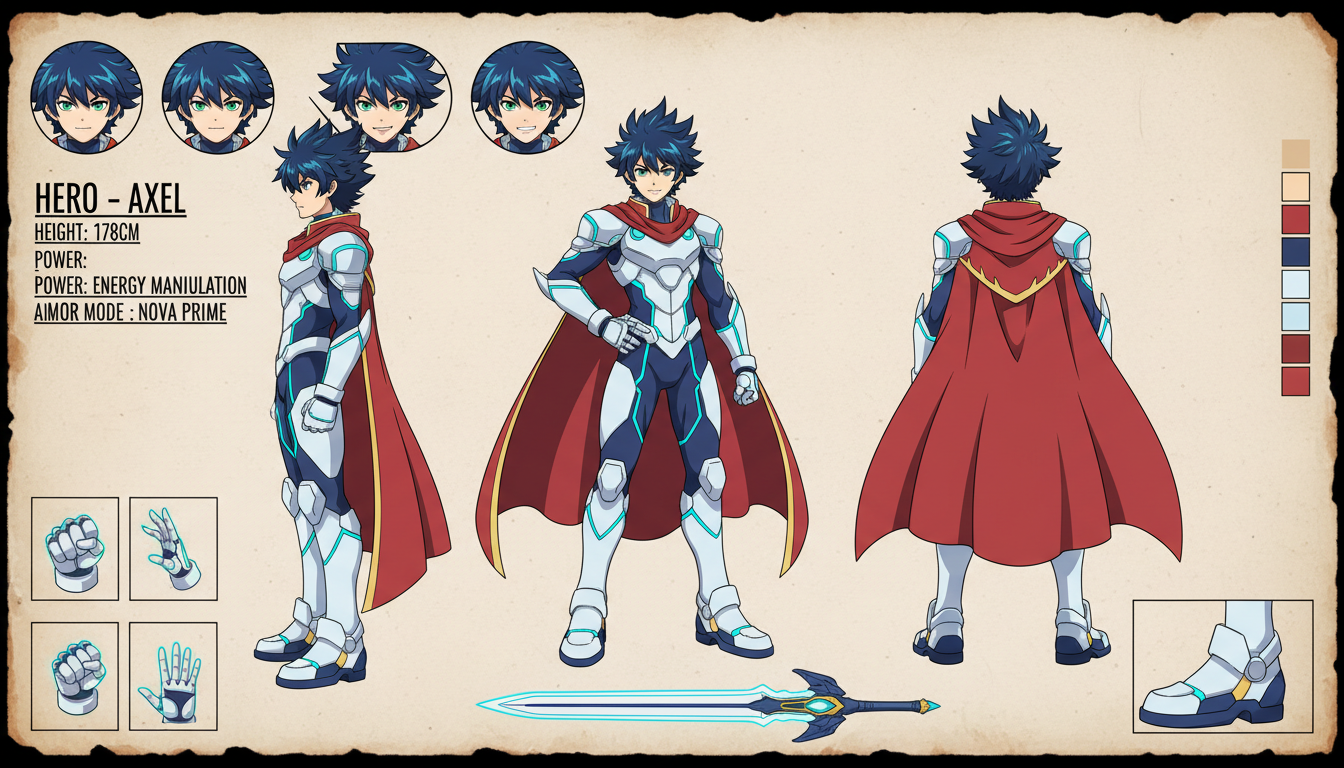 Consistent character across all standard reference views
Method 1: Flux Kontext Turnaround LoRA
The Flux Kontext Character Turnaround Sheet LoRA specializes in generating consistent multi-view character sheets:
Setup:
- Install Flux Kontext in ComfyUI
- Download the turnaround LoRA
- Load your character image as reference
Workflow:
Load Image → Flux Kontext → Turnaround LoRA → Generate
Prompt Template:
character turnaround sheet, front view, side view, back view,
3/4 view, white background, consistent design, same character,
full body, [your character description]
The LoRA reconstructs your character from five viewpoints while keeping proportions and details consistent.
Method 2: ControlNet Pose-Guided Generation
Use ControlNet with pose references to generate specific angles:
Step 1: Prepare Pose References Create or find stick figure/OpenPose references for each angle:
- Front pose reference
- Side pose reference
- Back pose reference
Step 2: Generate Each View Use the same seed, prompt, and settings for each view, changing only the ControlNet pose input.
Step 3: Composite Arrange individual views into a single sheet.
- Use the same seed across all generations
- Keep identical prompts except for angle keywords
- Set ControlNet weight to 0.7-0.9 for pose guidance
- Use the same model and VAE throughout
Method 3: Scenario.com Character Turnarounds
Scenario.com offers purpose-built turnaround generation:
Process:
- Upload a reference image of your character
- Select "Generate Turnaround" option
- Enable ControlNet Pose Mode for precise consistency
- Generate multiple views
Advantages:
- Custom character model training for maximum consistency
- Built-in turnaround sheet formatting
- Professional output ready for production
Method 4: Prompt-Only Generation
Some models respond well to "character sheet" keywords:
Prompt:
character sheet, multiple views, front view, side view, back view,
[character description], full body, white background, consistent style,
reference sheet, turnaround, same character all views
Best Models:
- SDXL trained on character sheets
- Anime-focused models (Pony, Illustrious)
- Custom trained character models
This method is less reliable but requires no special setup.
 Game-ready turnaround sheets require precise consistency
Maintaining Character Consistency
The core challenge is keeping the character identical across views. Strategies:
Use Reference Images: Always start from a single reference image. Use IP-Adapter or image conditioning to maintain identity.
Train Custom Models: For recurring characters, train a LoRA on 20-50 reference images. This ensures the AI understands your specific character.
Lock Seeds: Use the same seed across generations. This provides a consistent starting point for the AI.
Consistent Prompts: Keep character description identical. Only change angle/pose keywords.
Professional Formatting
For production-ready sheets:
Layout:
- 3:2 or 16:9 aspect ratio for the full sheet
- White or neutral background
- Even spacing between views
- Labels for each view (optional)
Resolution:
- Minimum 2048px width for professional use
- 4K for detailed character work
- Consistent resolution across all views
File Format:
- PNG with transparency if needed
- PSD with layers for editing
- Organized naming convention
Workflow for Different Use Cases
Animation: Focus on extreme consistency. Animators need exact proportions.
character model sheet, animation reference, precise proportions,
consistent line weight, clean lineart, front side back views
Game Development: Include T-pose for rigging if needed.
game character reference, T-pose included, full body,
front side back views, clean design, game asset ready
Concept Art: More stylistic freedom allowed.
character concept sheet, stylized, dynamic poses acceptable,
showing personality, costume details, multiple angles
Common Issues and Solutions
Issue: Face changes between views Solution: Use stronger character conditioning, train a character LoRA, or use Flux Kontext for identity preservation
Issue: Costume details inconsistent Solution: Be extremely specific about costume in prompts, use reference image conditioning
Issue: Proportions vary Solution: Use ControlNet pose guidance, lock seed, increase CFG scale
Issue: Style differs across views Solution: Use the same model and settings, avoid changing any parameters between views
Advanced: Expression Sheets
Beyond standard turnarounds, create expression sheets:
Prompt:
character expression sheet, same character, multiple expressions,
happy, sad, angry, surprised, neutral, consistent face,
head shots, white background
Combine with turnaround sheets for complete character references.
Frequently Asked Questions
Can I generate turnarounds for existing characters?
Yes, use reference image conditioning with IP-Adapter or Flux Kontext to maintain the existing design.
What resolution should turnaround sheets be?
Minimum 2048px width. 4K (4096px) for professional animation/game work.
How many views should a turnaround include?
Standard is 4-5: front, 3/4, side, back, and optionally a face close-up.
Can I generate turnarounds for non-humanoid characters?
Yes, though results vary. Creatures and robots work well. Abstract shapes are more challenging.
Should I use the same prompt for all views?
Yes, keep character description identical. Only add angle keywords like "front view" or "side view."
Conclusion
AI-generated character turnaround sheets are now production-viable with the right techniques. Flux Kontext with specialized LoRAs offers the best consistency, while ControlNet workflows provide maximum control.
The key is treating consistency as the primary goal. Use reference conditioning, lock your seeds, maintain identical settings, and choose tools designed for multi-view generation.
For professional work, consider training custom character LoRAs—the upfront investment pays off in perfectly consistent outputs every time.
Make AI images and video in your browser
Characters, video, photo packs. No GPU, no setup. Check your welcome allowance and the displayed cost before generating.
Related Articles

5 Proven AI Influencer Niches That Actually Make Money in 2025
Discover the most profitable niches for AI influencers in 2025. Real data on monetization potential, audience engagement, and growth strategies for virtual content creators.

AI Background Replacement: Professional Guide 2025
Master AI background replacement for professional results. Learn rembg, BiRefNet, and ComfyUI workflows for smooth background removal and replacement.

AI Character Consistency: How to Maintain Virtual Persona Identity Across Content
Learn techniques for maintaining AI character consistency across hundreds of images. Master the art of creating recognizable virtual personas with consistent visual identity.