VNCCS: Create Consistent Visual Novel Characters in ComfyUI
Visual Novel Character Creation Suite generates character sprites with consistent appearance across expressions, clothing, and poses. Complete guide to setup and workflows.
Visual novel developers have struggled with AI art since the beginning. You can generate beautiful character art, but making that character look the same across 20 expressions and 5 outfits? That's where most solutions fall apart.
VNCCS was built specifically to solve this problem.
Quick Answer: VNCCS (Visual Novel Character Creation Suite) is a ComfyUI extension that generates consistent character sprites through a structured workflow: base character creation, clothing sets, emotion sets, and final sprite generation. It maintains character identity across all variations using Illustrious-based SDXL models.
- Purpose-built for visual novel sprite production
- Workflow: Base character → Clothing → Emotions → Sprites
- Maintains consistent appearance across all generated images
- Works with Illustrious-based models (any SDXL model with limitations)
- Created by MIUProject, a visual novel developer
The Visual Novel Art Problem
Let me describe what visual novel production typically looks like with AI:
- Generate a character design you like
- Try to regenerate them with different expressions
- The face changes
- Try IPAdapter or reference images
- Better, but clothing and pose bleed through
- Try training a LoRA
- Wait 30 minutes, hope it doesn't overfit
- Finally get somewhat consistent results
- Repeat for every character
VNCCS collapses this into a simplified pipeline where consistency is built into the workflow, not fought against.
How VNCCS Works
The system breaks character creation into discrete stages:
Stage 1: Base Character Sheet
First, you generate a foundational character sheet. This isn't a single image. It's a sheet that captures your character from multiple angles and establishes their core visual identity.
The base sheet becomes the "ground truth" for all subsequent generations. Every other output references this sheet.
Stage 2: Clothing Sets
With your base character established, you generate clothing variations. VNCCS includes a "match strength" parameter that balances variety against consistency.
High match strength: Clothing stays close to base style, character looks very consistent Low match strength: More clothing variety, slight character drift possible
For most visual novels, high match strength works best. You want the same character in different outfits, not different characters in different outfits.
Stage 3: Emotion Sets
Emotions are generated while maintaining facial consistency. The denoise settings control how much the face changes between expressions.
Lower denoise: Subtle expression changes, maximum consistency Higher denoise: More dramatic expressions, slight face variation risk
Experiment to find the sweet spot for your style.
Stage 4: Final Sprite Generation
Once character, clothing, and emotions are defined, you generate finished sprites. These combine all elements into production-ready assets.
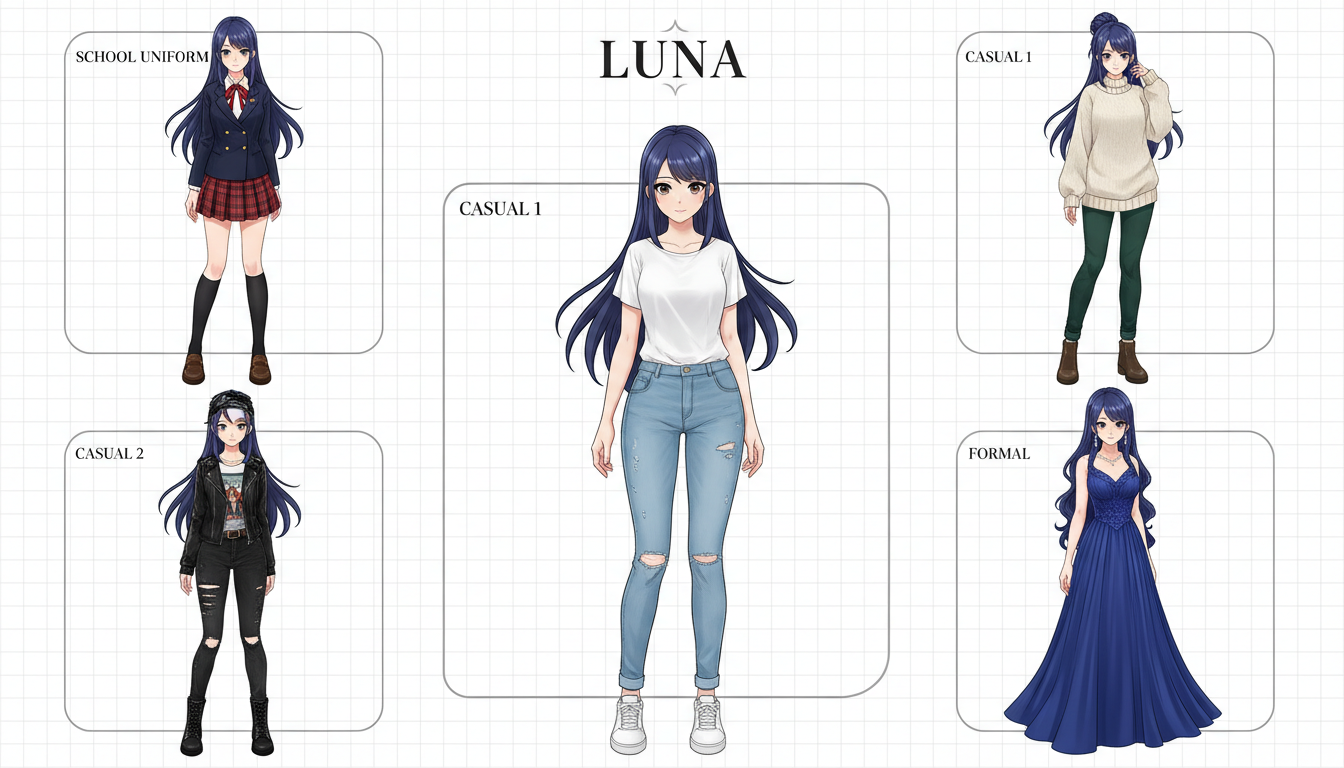 Base character with clothing variations maintaining consistent identity
Installation
VNCCS installs through ComfyUI Manager or manually:
Via Manager: Search "VNCCS" in Custom Nodes Manager and install.
Manual installation:
cd ComfyUI/custom_nodes
git clone https://github.com/AHEKOT/ComfyUI_VNCCS
Restart ComfyUI after installation.
Model Requirements
VNCCS works best with Illustrious-based models. These are SDXL models trained specifically for anime and illustration styles.
Recommended models:
- Illustrious-XL series
- Animagine XL variants
- Other anime-focused SDXL checkpoints
The extension should work with any SDXL model, but testing has been primarily on Illustrious-based checkpoints.
Additional Downloads
Get the VNCCS-specific models from HuggingFace:
- Reference models
- ControlNet weights (if applicable)
- Example workflows
Core Nodes
Character Creator
The main character generation node. Establishes base character appearance.
Key parameters:
- Character description: Text prompt describing your character
- Style tags: Art style modifiers (anime, detailed, etc.)
- Reference strength: How strongly to maintain reference
Clothing Generator
Creates outfit variations for your established character.
Key parameters:
- Clothing description: What the character should wear
- Match strength: Balance between variety and consistency
- Base reference: Connect to your character sheet
Emotion Generator
Generates expression variations.
Key parameters:
- Emotion type: Happy, sad, angry, surprised, etc.
- Denoise level: Controls expression intensity
- Face reference: Maintains facial identity
Sheet Extractor
Extracts individual sprites from generated sheets.
Key parameters:
- Grid size: How the sheet is divided
- Output format: Individual image specifications
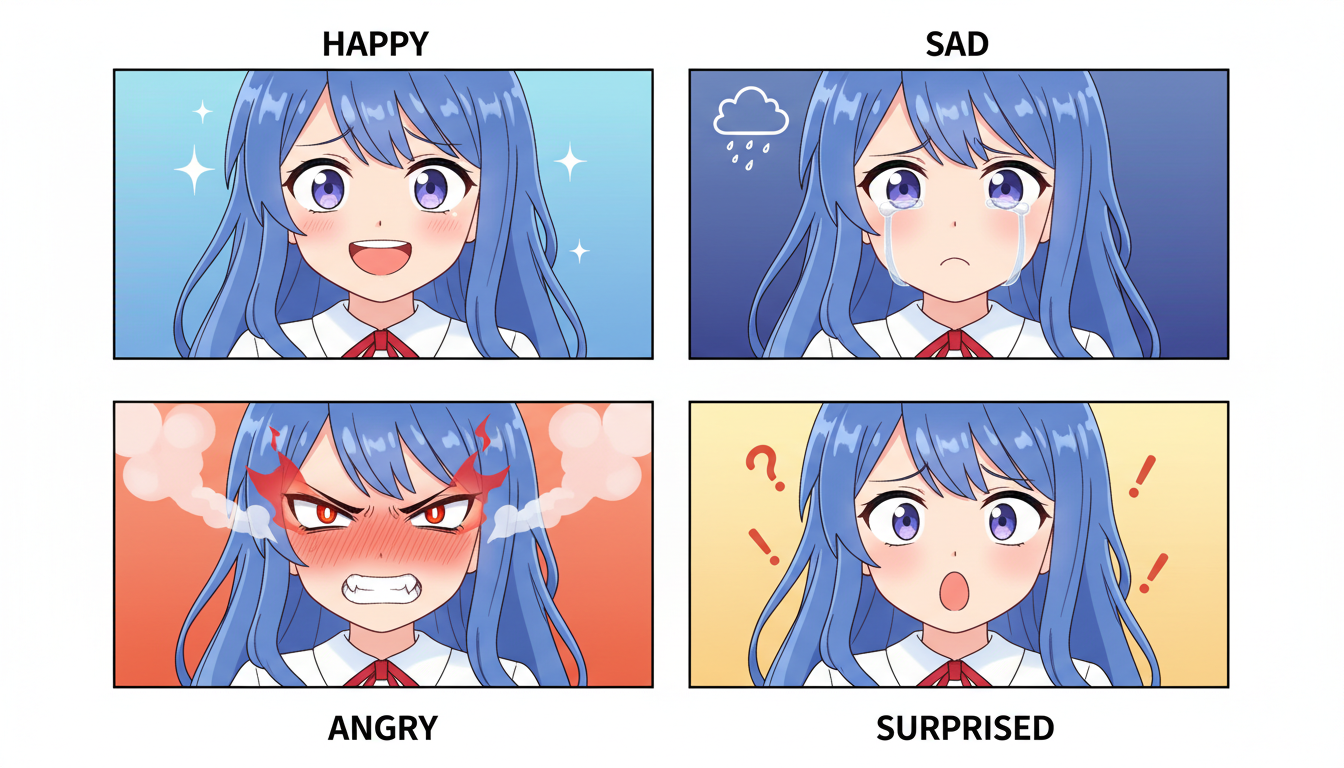 Emotion variations maintaining consistent character appearance
Practical Workflow
Here's a production workflow:
1. Design Your Character
Start with a detailed character description:
1girl, long silver hair, blue eyes, pointed ears, elf,
gentle expression, detailed face, anime style,
high quality, masterpiece
Include physical traits, not clothing (that comes later).
2. Generate Base Sheet
Run the Character Creator node with your description. Generate multiple sheets and pick the best one. This becomes your canonical reference.
3. Create Clothing Sets
For each outfit:
school uniform, white blouse, blue ribbon, plaid skirt
casual outfit, oversized sweater, shorts, relaxed pose
formal dress, elegant gown, jewelry, evening wear
Use high match strength (0.8-0.9) to maintain character identity.
4. Generate Emotions
For each clothing set, generate your emotion range:
- Neutral
- Happy
- Sad
- Angry
- Surprised
- Embarrassed
- Thinking
This creates your complete sprite set.
5. Extract and Export
Use Sheet Extractor to get individual sprites. Export at your target resolution.
Tips for Best Results
Write Detailed Descriptions
More detail = more consistent results. Don't be vague.
Instead of:
anime girl with blue hair
Write:
1girl, long straight blue hair reaching waist, side-swept bangs,
bright amber eyes, fair skin, heart-shaped face, small nose,
delicate features, anime style, detailed face, high quality
Use Negative Prompts
Exclude common problems:
multiple views, split image, lowres, bad anatomy,
bad hands, extra fingers, deformed face,
inconsistent style, blurry
Keep Art Style Consistent
Use the same style tags across all generations:
anime style, detailed, high quality, masterpiece,
thick outlines, vibrant colors
Inconsistent style tags cause visual inconsistency.
Test Before Batch Production
Generate a few test sprites before committing to full production. Verify consistency, quality, and that your settings work as expected.
Integration with Visual Novel Engines
VNCCS outputs work with standard visual novel engines:
Ren'Py: Export as PNG with transparency. Standard layered character format.
Unity Visual Novel Maker: Same PNG format works.
Tyrano Builder: Compatible with PNG sprites.
The transparent background option makes integration straightforward.
Comparison to Alternative Methods
| Method | Consistency | Speed | Learning Curve |
|---|---|---|---|
| Manual LoRA training | High | Slow | Steep |
| IPAdapter reference | Medium | Fast | Moderate |
| ControlNet poses | Low | Fast | Moderate |
| VNCCS | High | Medium | Low |
VNCCS trades some speed for built-in consistency without requiring LoRA training expertise.
When VNCCS Shines
Ideal for:
- Visual novel developers needing character sprites
- Game developers with multiple character expressions
- Comics/manga needing consistent character faces
- Any project requiring the same character in many poses/expressions
Less ideal for:
- Single illustrations
- Realistic photography style
- Non-anime art styles
Common Issues and Fixes
Character looks different between sets Lower match strength or increase reference weight. Ensure you're using the same base sheet.
Expressions are too subtle Increase denoise in emotion generator. Add stronger emotion descriptors to prompts.
Clothing bleeds into character design Generate base character without clothing first. Add clothing in the dedicated clothing stage.
Output quality issues Check your base model. Illustrious-based models produce best results.
The Developer's Perspective
VNCCS was created by MIUProject, who develops visual novels and faced these consistency problems firsthand. The tool solves a practical problem they encountered in production.
This origin matters. It means the workflow was designed for actual visual novel production, not as a general-purpose tool adapted to VN use.
FAQ
Does VNCCS work with non-anime styles? It was designed for anime. Other styles may work but aren't the primary focus.
How many expressions can I generate? No limit. Generate as many as your project needs.
Can I use my existing characters? You can use reference images to guide generation, but VNCCS is designed for creating new characters from descriptions.
Is it free? Open source. Check the license for commercial use terms.
What resolution are outputs? Depends on your model and settings. Typical outputs are 1024px for SDXL.
Can I generate full body sprites? Yes, though face-focused sprites are the primary strength.
Conclusion
VNCCS solves a real problem that visual novel developers face. Instead of fighting AI consistency issues, the pipeline builds consistency into the workflow from the start.
If you're developing visual novels and using AI for character art, VNCCS is worth testing. The learning curve is minimal compared to LoRA training, and the results are more consistent than reference-based approaches.
For cloud-based character generation without local setup, Apatero.com offers consistent character creation tools that complement local workflows.
Your characters deserve to look like themselves.
Some models you cannot download at any VRAM
Veo, Kling and Nano Banana have closed weights. There is no local build, no quantization, no 24GB workaround. Run them in the browser instead. Check current model access and generation costs in the app.
Related Articles

25 ComfyUI Workflow Tips: Settings and Review
Explore ComfyUI workflow organization, settings and output review, with a blank worksheet for comparing performance on your own setup.
7 ComfyUI Custom Nodes That Should Be Built-In (And How to Get Them)
Essential ComfyUI custom nodes every user needs in 2025. Complete installation guide for WAS Node Suite, Impact Pack, IPAdapter Plus, and more...
ADetailer Single Character Focus - How to Target Specific Faces in Multi-Character Images 2025
Master ADetailer and FaceDetailer to focus on single characters in multi-person images. Complete guide to targeting specific faces with different prompts in ComfyUI.