Flux Kontext Complete Guide: Instruction-Based Image Editing 2025
Master Flux Kontext for AI image editing with text instructions. Learn how to edit images without masks, maintain character consistency, and transform photos with simple prompts.

Traditional image editing requires masks, layers, and technical expertise. Flux Kontext changes everything by letting you edit images with simple text instructions. Tell it what to change, and it surgically edits exactly that part while preserving everything else.
Quick Answer: Flux Kontext is Black Forest Labs' instruction-based image editing model that transforms images through natural language commands. Available in Dev, Pro, and Max versions, it delivers professional editing results in 6-12 seconds without requiring masks or manual selection.
- Edit images with text instructions like "change hair to blonde" or "add sunglasses"
- Kontext Dev is open-weights and runs on consumer hardware
- Maintains character consistency across multiple edits
- Available in ComfyUI, Diffusers, and through APIs
- Sub-10-second processing keeps creative workflows fluid
What Is Flux Kontext and Why Does It Matter?
Flux Kontext represents a fundamental shift in how we approach image editing. Unlike traditional text-to-image models that generate entirely new images, Kontext understands existing images and modifies them through simple text instructions.
The technology performs in-context image generation, meaning it can extract and modify visual concepts while maintaining coherence with the original image. You're not starting from scratch—you're building on what exists.
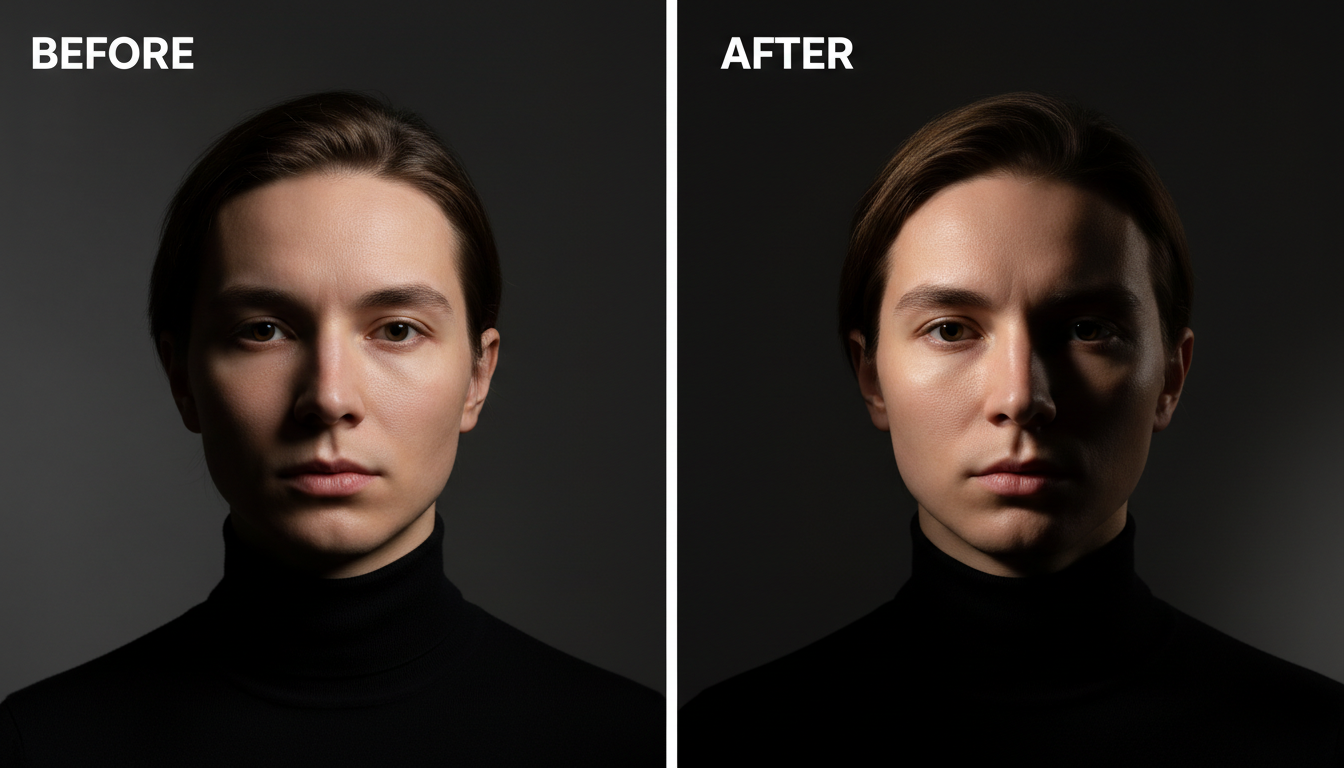 Flux Kontext enables precise edits through natural language instructions
This matters because image editing has traditionally required either significant technical skill or multiple specialized tools. Want to change someone's outfit? That's a masking job. Need to swap a background? Time to learn compositing. Flux Kontext collapses all these workflows into simple text prompts.
Understanding the Kontext Model Family
Black Forest Labs released Flux Kontext in three variants, each serving different use cases:
Kontext Dev is the open-weights version with 12 billion parameters. It runs on consumer hardware and delivers proprietary-level editing performance. This version is available on Hugging Face and works with ComfyUI and Diffusers.
Kontext Pro offers enhanced quality and speed through API access. It's designed for production workflows where consistency and reliability matter. Processing typically completes in 6-12 seconds.
Kontext Max represents the highest-quality tier with maximum accuracy in following instructions. It's available through Black Forest Labs' API and partner platforms.
- Kontext Dev: Best for local experimentation, learning, and projects without API costs
- Kontext Pro: Ideal for production workflows requiring speed and reliability
- Kontext Max: Choose when accuracy and quality are paramount over cost
How Flux Kontext Differs from Traditional Editing
The difference between Kontext and previous approaches is profound. Traditional AI editing methods require you to:
- Create a mask defining exactly what to change
- Describe the replacement in detail
- Hope the AI understands the spatial relationship
- Often repeat multiple times to get it right
Kontext eliminates most of these steps. You simply describe the change you want, and the model figures out what to modify and how to blend it naturally.
Consider changing a red shirt to blue. With traditional inpainting, you'd mask the shirt, prompt for a blue shirt, and likely struggle with lighting consistency. With Kontext, you write "change shirt color to blue" and the model handles everything—including matching the lighting, maintaining fabric texture, and preserving shadows.
 Kontext maintains character identity across multiple editing operations
Setting Up Flux Kontext in ComfyUI
Getting Kontext running locally requires some setup, but the process is straightforward:
Step 1: Install the Flux Kontext Custom Nodes
cd ComfyUI/custom_nodes
git clone https://github.com/kijai/ComfyUI-FluxKontext
Step 2: Download the Model
The Kontext Dev model is available on Hugging Face. Download it to your ComfyUI models folder:
ComfyUI/models/diffusion_models/flux1-kontext-dev.safetensors
Step 3: Configure VRAM Settings
Kontext Dev requires approximately 12GB of VRAM for comfortable operation. If you're running on 8GB cards, enable offloading:
## In your ComfyUI launch arguments
--lowvram
Step 4: Load the Workflow
Basic Kontext workflows include a source image loader, a text prompt node for your editing instruction, and the Kontext sampler. Connect them in sequence and you're ready to edit.
Mastering Kontext Prompting
Effective Kontext prompts are direct and specific. Unlike image generation prompts that build up elaborate descriptions, editing prompts should focus on the change itself.
Good Prompts:
- "Change hair color to platinum blonde"
- "Add round glasses"
- "Replace background with beach sunset"
- "Change outfit to formal business suit"
- "Make the person smile"
Less Effective Prompts:
- "A beautiful person with blonde hair standing in a scenic location" (too generative)
- "Maybe change the hair a bit" (too vague)
- "Hair" (needs an action)
The key is specificity without over-description. Kontext understands context from the source image, so you don't need to describe what's already there.
- Use action words: "change," "add," "remove," "replace"
- Be specific about what you want: "blue eyes" not "different eyes"
- Don't describe the whole image—focus on the edit
- For style changes, specify the target style clearly
Character Consistency with Kontext
One of Kontext's standout features is maintaining character identity across multiple edits. This makes it exceptional for:
- Creating character variations for games or stories
- Generating multiple poses of the same person
- Building consistent social media content
- Producing product variations with the same model
The model's character memory means you can chain multiple edits on the same character without losing their essential features. Change the outfit, then the background, then add accessories—the person remains recognizably the same throughout.
Practical Use Cases
Fashion and E-commerce: Quickly generate product variations by changing colors, patterns, or styles. A single photoshoot can produce dozens of variations through Kontext editing.
Content Creation: Social media managers can create multiple versions of content for A/B testing without additional photoshoots.
Game Development: Generate character variations, outfit options, and expression sheets from a single base design.
Photography Enhancement: Add or remove elements from photos, change backgrounds, or adjust styling without Photoshop expertise.
Kontext vs Other Editing Solutions
How does Kontext compare to alternatives?
Vs. Traditional Inpainting: Kontext wins on ease of use and natural integration. Inpainting still offers more precise spatial control when you need to edit a specific pixel area.
Vs. IP-Adapter Workflows: IP-Adapter excels at style transfer and character reference. Kontext is better for specific edits while maintaining the original image's content.
Vs. Image-to-Image: Image-to-image creates variations of the whole image. Kontext surgically edits specific elements while preserving everything else.
Performance and Hardware Requirements
Kontext Dev runs on consumer hardware with these minimum specs:
- GPU: RTX 3060 12GB or better
- RAM: 16GB system RAM minimum
- Storage: ~24GB for the model
For comfortable operation, 16GB VRAM provides smooth performance. The model supports various precision modes:
- FP16: Standard quality, moderate VRAM
- FP8: Reduced VRAM, slight quality reduction
- BF16: Best quality on supported hardware
Processing time depends on hardware:
- RTX 4090: 6-8 seconds per edit
- RTX 3080: 12-15 seconds per edit
- RTX 3060: 20-30 seconds per edit
Common Issues and Solutions
Issue: Edits don't match the lighting Solution: Add lighting context to your prompt: "change hair to blonde, matching existing warm lighting"
Issue: Too much of the image changes Solution: Be more specific about what should change and what shouldn't: "change only the shirt to blue, keep everything else identical"
Issue: Character face changes slightly Solution: Add "preserve face identity" to your prompt or reduce the guidance scale
Issue: Background bleeds into subject Solution: Try breaking the edit into steps—first the subject, then the background
Integrating Kontext into Production Workflows
For production use, consider these integration patterns:
API Integration: Use the official API for consistent, scalable processing. Rate limits and pricing vary by tier.
Batch Processing: Set up ComfyUI batch workflows to process multiple images with similar edits.
Quality Control: Implement review steps since AI editing occasionally produces unexpected results.
Version Control: Save intermediate states when chaining multiple edits so you can backtrack if needed.
Future of Instruction-Based Editing
Kontext represents the beginning of instruction-based editing, not its final form. Expect:
- Faster processing as models optimize
- Better understanding of complex instructions
- Integration with video editing workflows
- Enhanced character consistency features
- Multi-modal instructions (text + sketch + reference)
The technology is evolving rapidly, with improvements arriving every few months.
Frequently Asked Questions
Can Kontext edit any image?
Yes, Kontext works with any image input. Quality depends on image resolution and content complexity. Higher resolution inputs generally produce better results.
Is Kontext Dev commercially usable?
Kontext Dev has a non-commercial license. For commercial use, you need Kontext Pro or Max through the official API.
How does Kontext handle multiple subjects?
Kontext can target specific subjects if you describe them: "change the person on the left's hair to red." For complex scenes, results may require iteration.
Can I chain multiple Kontext edits?
Yes, you can run multiple sequential edits. Each edit takes the previous output as input. Character consistency is maintained across chains.
What's the maximum input resolution?
Kontext handles various resolutions but works best with images around 1024x1024. Very large images may require tiling or downscaling.
Conclusion
Flux Kontext democratizes image editing by replacing technical complexity with natural language. Whether you're a content creator, designer, or developer, the ability to edit images by simply describing changes opens new creative possibilities.
Start with Kontext Dev to experiment locally, then consider Pro or Max for production workflows. The learning curve is minimal—if you can describe what you want, you can use Kontext.
The technology is particularly powerful for maintaining character consistency across variations, making it invaluable for anyone creating content that requires visual coherence. As the technology matures, expect instruction-based editing to become the default approach for most image modification tasks.
Some models you cannot download at any VRAM
Veo, Kling and Nano Banana have closed weights. There is no local build, no quantization, no 24GB workaround. Run them in the browser instead. Check current model access and generation costs in the app.
Related Articles

5 Proven AI Influencer Niches That Actually Make Money in 2025
Discover the most profitable niches for AI influencers in 2025. Real data on monetization potential, audience engagement, and growth strategies for virtual content creators.

AI Background Replacement: Professional Guide 2025
Master AI background replacement for professional results. Learn rembg, BiRefNet, and ComfyUI workflows for smooth background removal and replacement.

AI Character Consistency: How to Maintain Virtual Persona Identity Across Content
Learn techniques for maintaining AI character consistency across hundreds of images. Master the art of creating recognizable virtual personas with consistent visual identity.